Friday, January 29, 2021

List Of Xiaomi Devices That Have Received MIUI 12 Android 11 Update

MIUI 12 Android 11 Xiaomi devices

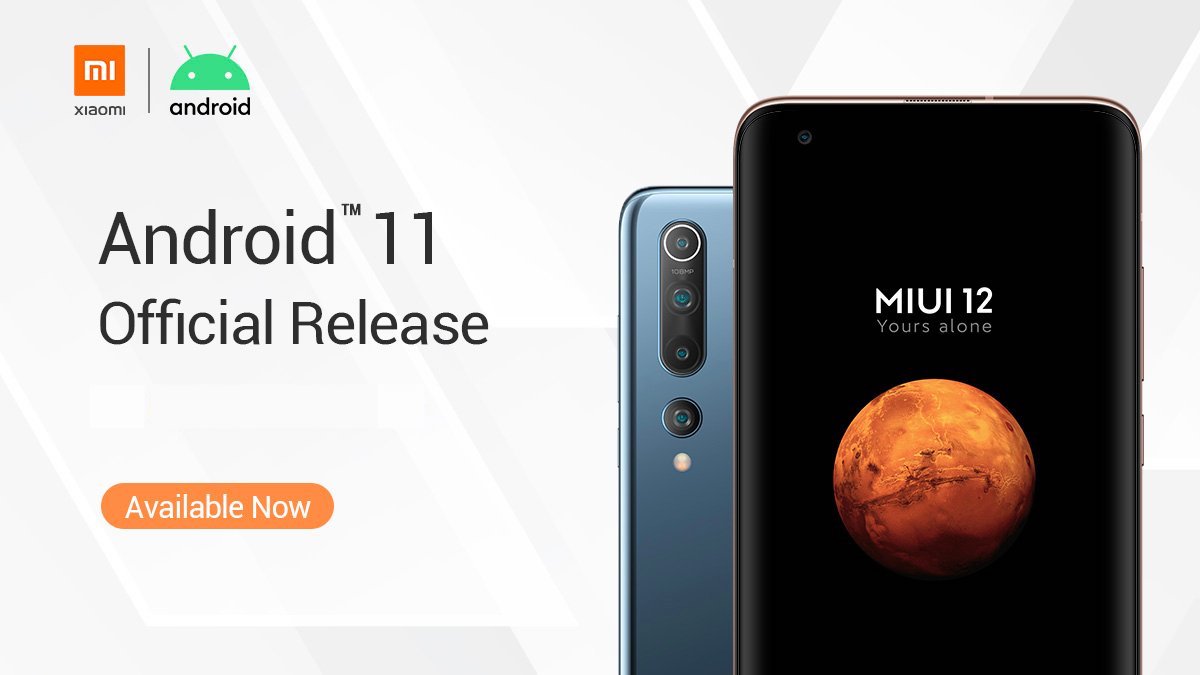
Xiaomi picked up Android 11 when it was still in the early betas. The Chinese manufacturer was part of the Google Beta program, and therefore the Android 11 beta was available on a bunch of its high-end devices such as Mi 10, Mi 10 Pro, and Redmi K30 Pro.

However, the Android beta made available to Xiaomi users was based on AOSP and not MIUI 12 (the custom Android skin used by Xiaomi devices). Basically, the beta was miles away from what Xiaomi users would get in the final update.

A few months later, Google launched the Android 11 stable version for Pixel devices. Meanwhile, Xiaomi began testing MIUI 12 Closed Beta updates based on Android 11 on Mi 10 and Mi 10 Pro in China.

Now, as Android 11 spreads on devices from different manufacturers, Xiaomi is also rolling out MIUI 12 Android 11 Stable updates for its devices.

Xiaomi MIUI 12 Android 11 Update Tracker

Here are the Xiaomi devices that have received the Android 11-based MIUI 12 update.

1. Mi 11

Region Build Channel Recovery ROM Fastboot ROM
China V12.0.17.0.RKBCNXM Stable Link Link

2. Mi 10 Pro

Region Build Channel Recovery ROM Fastboot ROM
China V12.2.2.0.RJACNXM Stable Link Link
Global V12.2.1.0.RJAMIXM Stable Link Link
Europe V12.2.3.0.RJAEUXM Stable Beta Link

3. Mi 10

Region Build Channel Recovery ROM Fastboot ROM
China V12.2.8.0.RJBCNXM Stable Link Link
Global V12.2.1.0.RJBMIXM Stable Beta Link
Europe V12.2.4.0.RJBEUXM Stable Beta
India V12.2.2.0.RJBINXM Stable Beta Link

4. Mi 10 Lite Zoom

Region Build Channel Recovery ROM Fastboot ROM
China V12.1.4.0.RJVCNXM Stable Link Link

5. Mi 10 Lite

Region Build Channel Recovery ROM Fastboot ROM
Global V12.1.1.0.RJIMIXM Stable Link Link
Europe V12.1.3.0.RJIEUXM Stable Link Link

6. Mi Note 10 Lite

Region Build Channel Recovery ROM Fastboot ROM
Global V12.1.1.0.RFNMIXM Stable Beta
Europe V12.1.1.0.RFNEUXM Stable Beta Link

7. Mi CC 9 Pro

Region Build Channel Recovery ROM Fastboot ROM
China V12.1.3.0.RFDCNXM Stable Link Link

8. Redmi K30 Pro/Poco F2 Pro

Region Build Channel Recovery ROM Fastboot ROM
China V12.2.2.0.RJKCNXM Stable Link Link
Global V12.2.4.0.RJKMIXM Stable Link Link
Europe V12.2.4.0.RJKEUXM Stable Link Link

9. Redmi K30 5G

Region Build Channel Recovery ROM Fastboot ROM
China V12.1.4.0.RGICNXM Stable Link Link

10. Redmi K30 4G

Region Build Channel Recovery ROM Fastboot ROM
China V12.1.3.0.RGHCNXM Stable Link Link

11. Redmi K30i 5G

Region Build Channel Recovery ROM Fastboot ROM
China V12.1.1.0.RGICMXM Stable Beta

12. Poco X2

Region Build Channel Recovery ROM Fastboot ROM
India V12.1.2.0.RGHINXM Stable Beta

13. Mi A3

Region Build Channel Recovery ROM Fastboot ROM
Global V12.0.2.0.RFQMIXM Stable Link
Europe V12.0.1.0.RFQEUXM Stable Link

14. Redmi Note 9 Pro

Region Build Channel Recovery ROM Fastboot ROM
India V12.0.3.0.RJWINXM Stable Beta Link

Xiaomi Android 11 Update: Stable vs Stable Beta

Xiaomi issues a different MIUI update for each device in different regions. The update for a particular Xiaomi device can be a stable or a stable beta.

Stable beta builds are essentially the final stable builds; however, they are first sent to beta testers to weed out bugs or software issues. After taking feedback from beta users, Xiaomi fixes the small errors, if there are any, and rolls out the same update for all the Xiaomi users.

It is important to note that MIUI 12 Android 11 Stable beta builds are only available to users who applied for the Mi Pilot tester program, which Xiaomi announces on the Mi Community from time to time.

How to get Android 11-based MIUI 12 Update on your Xiaomi device?

Note that if you try to flash a beta build without being part of the beta program, the Xiaomi device will display an error that the device is not authorized.

Here’s how to install Xiaomi Android 11 update —

1. Using the Recovery ROM method

You can use this method if you haven’t received the OTA update.

  1. Download the MIUI 12 OTA update or MIUI 12 Recovery ROM from the links below.
  2. Transfer the file to the “Download_rom” folder on your Xiaomi device.
  3. Go to Settings → About Phone → System updates.
  4. Tap on the MIUI logo 7-8 times to access recovery options.
  5. Tap on the triple-dot menu → Choose Update Package → Select the MIUI 12 update file.
  6. After verifying the file, the device will start installing the update.

2. Using the Fastboot ROM method

Prerequisites:
MiFlash Tool (Download)
Unlocked Bootloader of the Xiaomi device (How-to)
USB Debugging turned on in Developer Settings (How-to)

  1. Press the Power button and Volume down simultaneously to enter Fastboot mode on your Xiaomi device.
  2. Connect your Xiaomi device with a Windows PC via a micro USB cable.
  3. Download the supported Fastboot ROM and extract the files. Copy the folder location. (Make sure there are no spaces in the address. If the extracted folder has spaces in-between, replace them with an underscore “_”)
  4. Run the MiFlash Tool as an administrator.
  5. Click on the “Refresh” button. Your Xiaomi device will appear on the screen.
  6. Paste the extract location in the MiFlash tool’s address bar.
  7. Below, choose whether you want a clean installation or want the data to remain intact.
  8. Click on the “Run” button to begin the flashing process.
  9. You will see the status as “Success” after a few minutes.

Upcoming Android 11 updates for Xiaomi devices

A few days back, Xiaomi confirmed the next batch of devices that will be getting Android 11 update.

  • Redmi Note 8
  • Redmi Note 8 Pro
  • Redmi K20 Pro / Mi 9T Pro
  • Redmi K30S Ultra
  • Mi CC9 Meitu Edition
  • Mi 9 SE
  • Mi 9
  • Mi 9 Pro

As you can see, it’s the 2019 lineup from Xiaomi that will be the Android 11 update next. It’s a no-brainer that the update will first arrive on the China variants.

The post List Of Xiaomi Devices That Have Received MIUI 12 Android 11 Update appeared first on Fossbytes.


List Of Xiaomi Devices That Have Received MIUI 12 Android 11 Update
read more

2021 Tesla Model S Unveiled: See How’s It Different From The 2020 Variant?

2021 Tesla Model S Plaid

It’s been quite a while since we have been reporting on the refreshed variant of the 2021 Tesla Model S. A refreshed variant of the Model S was spotted testing in the hometown of Tesla, California.

Also, when the EV maker stopped production of Model S during the Christmas break we speculated that an updated variant of the sedan is about to come.

Finally, after lots of anticipation, predictions, rumors, and reports, the 2021 Tesla Model S is here. So, without any further ado, let’s explore it.

New Model S Variants

Previously, there were three variants, including Tesla Model S Performance, Long Range, and Plaid variant. However, the Plaid variant was available only for bookings.

However, there’s no Performance variant for the refreshed 2021 Model S. Instead, the automaker introduced the new Plaid Plus variant with a 520+ miles range. So, basically, there are still three variants again and they are:

  • Tesla Model S Long Range
  • Tesla Model S Plaid
  • Tesla Model S Plaid Plus.

You can think of the Plaid variant as a successor to the Performance variant as it boasts a similar range. However, the biggest difference lies in the platform on which they are built.

Tesla Model S Plaid is built on a wider chassis for better performance.

Range And Performance Of 2021 Tesla Model S

S.No. Variants Range Acceleration (0-60 mph)
1. Tesla Model S Long Range 412 Miles 3.1 seconds
2. Tesla Model S Plaid 390 Miles 1.99 seconds
3. Tesla Model S Plaid Plus 520+ Miles <1.99 seconds

Additionally, both Plaid and Plaid Plus variants have breathtaking top speeds of 200 mph and are equipped with tri-motors.

If we compare it with the last generation Model S, then there’s an improvement in both the electric range as well as performance due to the new battery architecture.

tesla model s electric range

Earlier, the Long Range variant had an electric range of 402 miles and was slower by about 0.5 seconds.

Similarly, the Performance variant, which is no longer in the picture, had 387 miles range and an acceleration figure of 2.3 seconds.

Furthermore, the Plaid variant is an extremely powerful electric sedan with a total power output of more than 1006 BHP.

With this insane powerhouse, it can sprint quarter-mile in just 9.23 seconds, which is quicker than its biggest upcoming rival Lucid Air.

Anyway, let’s discuss the outer appearance and interior design changes of the 2021 Tesla Model S.

Design Changes: Aggressive look And Sporty Interior

2021 tesla model s

For the first time after 2012, Tesla Model S received such a significant makeover.

Exterior Profile Of 2021 Model S

The 2021 Model S is built on a new performance-oriented chassis. It’s the same plaid powertrain we mentioned in our previous articles.

Due to this new chassis, the 2021 Model S looks wider and aggressive than before.

2021 tesla model s side profile

The second most striking feature is the replacement of chrome strips with black trims. This idea has been borrowed from what we saw in the 2021 Tesla Model 3.

We hope that all upcoming model updates will get a similar treatment.

The headlights look similar to the 2020 Model, however, the front bumper, as well as the fog light casing, is quite different.

Apart from this, designers at Tesla put extra effort into the aerodynamics of the Model S.

The 2021 Tesla Model S, as claimed by the EV maker, is the most aerodynamic production car on earth.

The latest variant of the flagship electric sedan Model S has a drag coefficient of 0.208.

Overall, there are several minor and major design upgrades yet the Model S holds its original essence.

Interior Of 2021 Tesla Model S

2021 tesla model s interior

Though you might have to watch attentively to notice the difference in outer appearance, in the case of interior you can easily spot most of them.

Some of the biggest interior modifications include:

  • Steering Wheel: The 2021 Tesla Model S sports a formula one-inspired steering wheel for better performance and control. However, Tesla is calling it a yoke steering wheel. The steering wheel alone indicates that the Model S is made for the ultimate performance.
  • Horizontal Center Display: Earlier, there was a vertical 17-inch display in the center console, which has now been converted into a horizontal one. It’s a 2200*1300 resolution display with ultra-bright color, better responsiveness, and left-right tilt which is ideal for entertainment as well as gaming. In addition, there’s another display in front of the driver for vehicle information.
  • Display For Rear Passengers: There’s also a third display inside the car for the rear passengers.
rear passenger display model s
  • New Glass Sunroof: The new sunroof allows more light into the cabin and gives a better look at the interior when peeping from above. Apart from this, there are new seats, a 22 speaker audio system, and much more.

You can see more details here.

2021 Tesla Model S Price

Here’s the price list for all three variants:

S.No. Trims Price
1. Tesla Model S Long Range $78,490
2. Tesla Model S Plaid $118,490
3. Tesla Model S Plaid Plus $138,490

All the prices mentioned above are before the potential savings. Prices may be reduced based on the incentives.

According to the automaker, the long-range and plaid variant will hit the market somewhere in March. However, the plaid plus variant is expected to arrive in late 2021.

The post 2021 Tesla Model S Unveiled: See How’s It Different From The 2020 Variant? appeared first on Fossbytes.


2021 Tesla Model S Unveiled: See How’s It Different From The 2020 Variant?
read more

18 Free Movie Download Sites For 2021 [Legal Streaming]

free movie sites

We love movies and we love them even more if they are free. If you open your web browser and type free movie download websites, you’ll be presented with a long list of illegal websites promising to grab your favorite blockbuster in a matter of seconds. We are here with a list of some free movie download websites where you can get some quality entertainment without paying any money.

There are many legal sources that provide free movies and TV shows; you can check out our list of sites for free and legal music and free sports streaming as well.

Free Movie Download Websites – Legal Streaming

1. YouTube

youtube free movies

In an earlier version of this article, YouTube was listed a lot lower in this list. However, thanks to some recent changes and the company’s growing inclination towards free, ad-supported content, I’ve decided to list it as the #1 source of free movies on the web in the year 2021.

Now, YouTube offers more than 350 complete feature-length films on its platform (please note that it’s different from YouTube TV, which is a live TV streaming service). It’s also mentioned on our latest list of best movie streaming sites. This makes YouTube a perfectly free movie website for those who can’t afford to spend a premium for accessing Netflix and Hulu content. You can simply visit this link and watch movies like Zookeeper, Legally Blonde, The Terminator, Flawless, Kung Fu Killer, IP Man, and more. Moreover, YouTube also has plans to make its original shows and movies free.

What we like about YouTube

  • More than 350 movies for streaming
  • Reliability of YouTube’s interface
  • Cross-device functionality

2. The Internet Archive

You’ll be surprised to find The Internet Archive sitting at the top of our free movie download websites. It like a goldmine to download free movies, music, and books. This list includes the original Jungle Book, Farewell to Arms, Iron Mask, Night of the Living Dead, The Brother from Another Planet, etc.

About 4-5 years ago, The Internet Archive just provided direct links and often the movie downloads failed as the file sizes were large. Thanks to the torrent links, now you can easily enjoy and download hundreds of movies without spending a penny. The overall catalog found on this website is continuously growing and new content is added every day.

This free movie download site also allows creating a free virtual library card which grants you access to forums, the ability to upload videos, bookmark favorite content, etc.

Availability: Everywhere

What we like about The Internet Archive

  • Vast directory of movies to download across multiple genres
  • Movie downloads available all across the world
  • Torrent download option on some movies

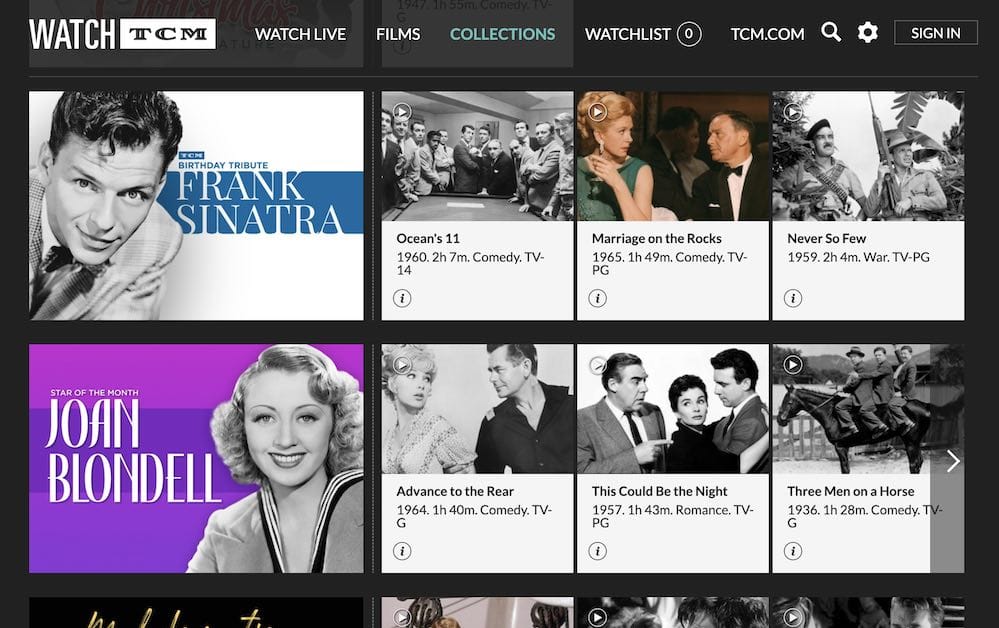
3. Watch TCM

watch tcm movie download

As an added benefit, many movie studios and streaming services offer free access to movie websites if you have an active cable subscription. Out of all such free offerings, Turner Classic Movies’ TCM features the best collection of movies. Called Watch TCM, this service lets you watch an unlimited number of free movies with either a cable or satellite package.

Some of the most popular feature films on Watch TCM are Gone With The Wind, Westworld, Casablanca, etc. What makes TCM even better is the availability of dedicated apps for Android, iOS, Apple TV, etc. The service also contains articles, information about artists, short movies, and lists of movie recommendations.

Availability: USA

What we like about Watch TCM

  • Can be coupled with cable TV subscription
  • Watch classics across different platforms

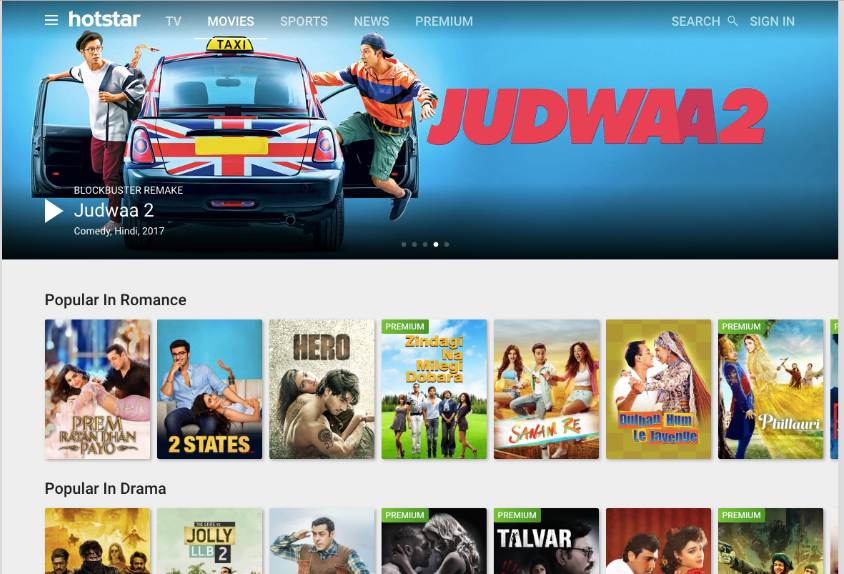
4. Hotstar

Having talked about the American viewers and the availability of free movies for them in the YouTube section, let’s talk about Indian/Hindi content. Even though paid services like Netflix and Amazon Prime Video are focusing more and more on Indian audiences, Hotstar remains a good source of free streaming and movie download for offline streaming.

This free movie download site’s catalog has a good amount of popular Indian movies like Housefull, Raid, Kaabil, Jolly LLB, Bodyguard, and more. The interface of the service is pretty neat and there’s a well-designed app as well. Moreover, Hotstar is also great for watching Indian TV shows, sports, and news for free.

Availability: India (free), USA (Paid)

What we like about Hotstar

  • Best source of free entertainment for Indian viewers
  • Affordable premium subscription for movie downloads

5. The Korean Film Archive

The Korean Film Archive on YouTube is a hidden gem that cinephiles looking for movie downloads will surely appreciate. Named Korean Classic Film, this official channel contains more than 200 classic Korean movies right from the 1930s onwards. With the increasing popularity of Korean cinema in the West, this channel is the perfect way to explore the classic works of South Korean Cinema.

Some of the notable works streaming for free include The Day A Pig Fell Into The Well, Aimless Bullet, A Dwarf Launches A Little Ball, Sopyonje, etc. All the movies come with English subtitles, so you don’t have to worry about the language barrier. If you love cinema, go ahead and give these free movies a try — you won’t be disappointed.

Availability: Everywhere

What we like about The Korean Film Archive

  • Best source of free movies for Korean cinephiles
  • Availability of English subtitles

6. Le CiNéMa Club

Earlier this year, the highly-curated Indie film streaming site Le CiNéMa Club was relaunched with a redesigned interface. First launched in 2015, the website aims to promote new talent and provide exposure to rare gems that don’t get the attention they deserve.

The website is known to stream one new film each week and is open to contributions from filmmakers. While most of the content you’ll find on the site is of short-film nature, the website is open to features of any length. The site has notably streamed  Claire Denis’ ultra-rare “Keep It for Yourself” in the past. At the time of writing this article, the website is streaming Diddly Squat by Frank Lebon.

Availability: Everywhere

What we like about Le CiNéMa Club

  • One new and curated movie every week
  • Diverse and original movies

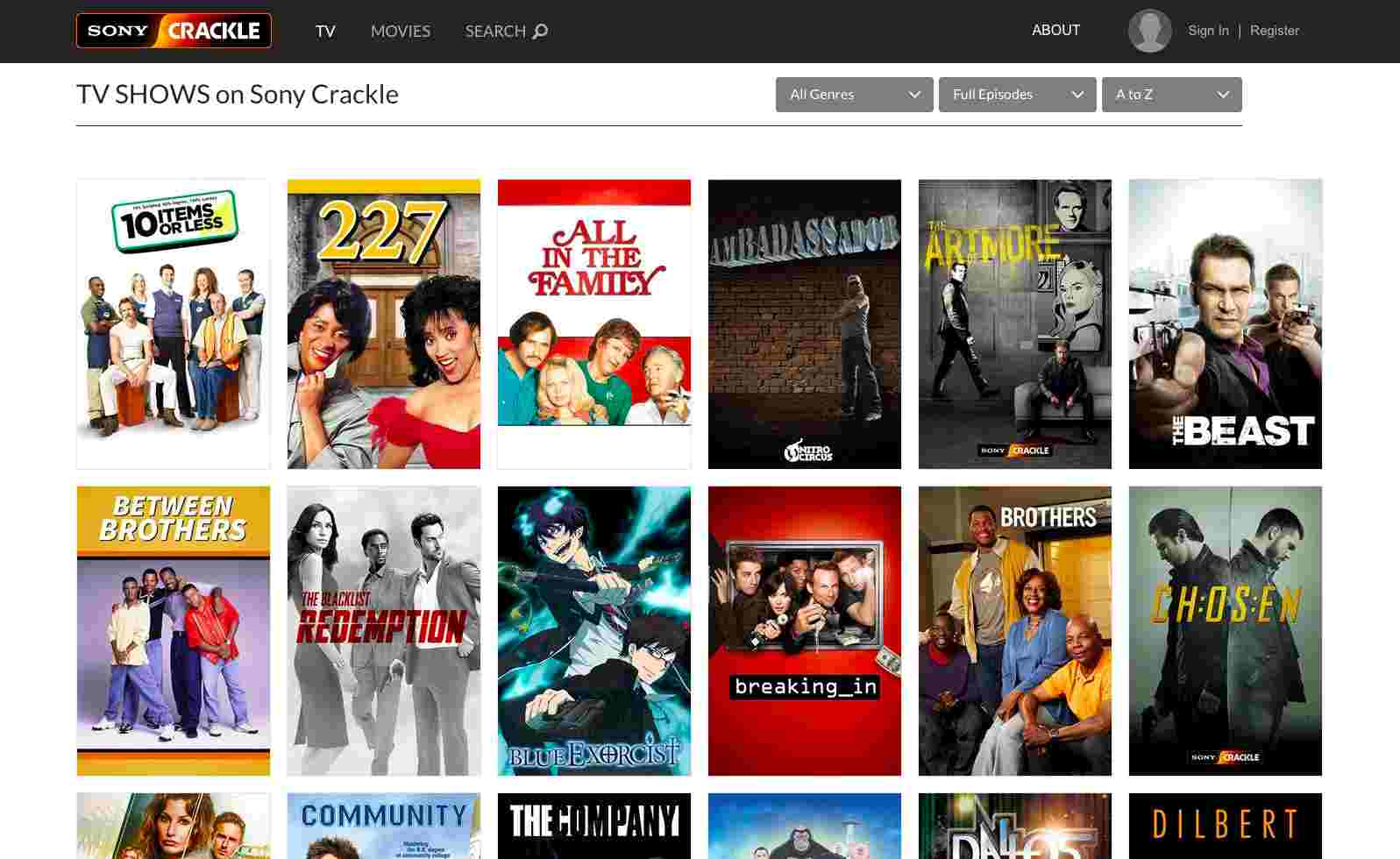
7. Crackle

Sony Crackle


Crackle is a great website for free movies online as it’s owned by Sony. So, naturally, you get lots of movies to watch. You need to signup, create a watchlist and you’ll be shown recommendations based on your priorities.

Crackle offers lots of popular movies and TV shows that you won’t find for free on other websites. As long as you are willing to watch a couple of ads and commercials. Some of its great offerings include Seinfeld, Firefly, Sports Jeopardy, and more. Crackle has Android and iOS apps as well, which is an obvious plus point.

Some of the content on Crackle could be blocked in your country due to license restrictions. You can access them using a VPN or proxy service.

Availability: USA

What we like about Crackle

  • More than 100 fully legal movies for free streaming
  • Handy subtitle settings for easy viewing

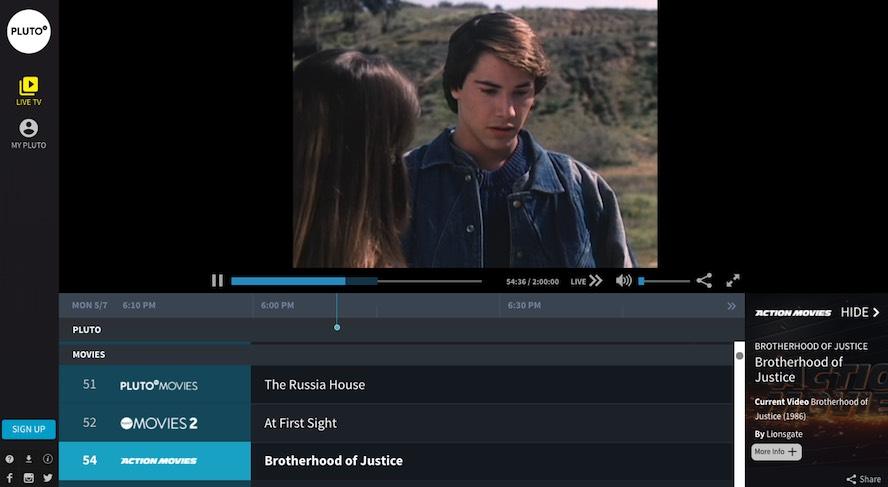
8. Pluto TV

free movies online pluto tv

Pluto TV tries to mimic a traditional TV layout and it’s one of my favorite services on this list. This service to watch free movies online offers 75+ TV channels from different categories. All these channels are divided into news, TV, movies, tech, sports, and other popular sections.

Pluto TV also offers its official application for almost all popular platforms and you can enjoy the content on the go. They also have their own dedicated movie channel.

One thing you should note is that some channels will only be available if you’re in the US. So, you can either use a VPN service or a proxy for an uninterrupted experience.

Availability: Worldwide (More content in the US)

What we like about Pluto TV

  • Traditional TV-like interface
  • Wordwide, cross-platform availability

9. A24 Movies on Kanopy

When we talk about hidden movie streaming gems, we can’t miss Kanopy. By partnering with libraries and universities all across the world, Kanopy has managed to deliver a unique collection of content for free. Just last year, Kanopy announced its partnership with Oscar-winning movie studio A24. As a result of this, widely celebrated features like Lady Bird, Good Time, Room, The Lobster, The Florida Project, Moonlight, First Reformed, etc., are available to stream for free.

Availability: Everywhere

What we like about Kanopy

  • Tons of award-winning and independent movies
  • Unique streaming model (library card supported)

10. Open Culture

Open Culture offers high-quality videos from all across the world. It’s home to free movies, free online courses, and free language lessons. Founded in 2006, it has 6 main sections: Movies, Online courses, Language lessons, e-Books, Textbooks, Audiobooks.

Movies section consists of an excellent collection. Currently, it hosts 1,150 free movies online that includes a special collection of Oscar-Winning Movies and Charlie Chaplin movies.

Availability: Everywhere

What we like about OpenCulture

  • Special award-winning collection of Andrei Tarkovsky and Charlie Chaplin movies
  • Online courses, podcasts, ebooks, and audio books

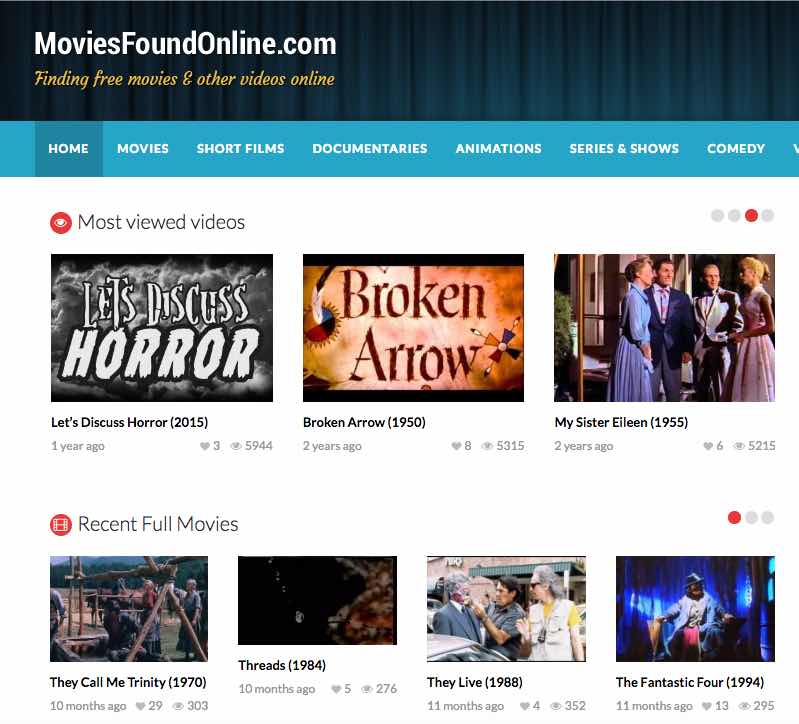
11. MoviesFoundOnline

movies found online free feature films


This website curates free movies, independent films, TV shows, and stand-up comedy video. The website hosts free movies ranging from cult classics and short films to documentaries and comedy movies.

This website curates lots of public domain movies and serves them to you. As MoviesFoundOnline doesn’t host or upload any media on its own, it works actively to delete the movies if there’s some copyright infringement.

Availability: Everywhere

What we like about MoviesFoundOnline

  • Night mode feature for comfortable browsing
  • Also features short films, documentaries, animations, and TV shows

12. NoBudge

If I call NoBudge a one-person project, I won’t be wrong. Founded by indie filmmaker and actor Kentucker Audley, this website is dedicated to independent short and feature films. Most of the movies on NoBudge haven’t been much seen or reviewed by the critics, so you’ll have to stream them without any assistance of any kind. However, since each money is personally selected by Audley, the chances of stumbling on a bad movie are slim.

Availability: Everywhere

What we like about NoBudge

  • One fresh, hand-picked film every day with director’s interview
  • 60% profit goes to independent filmmakers

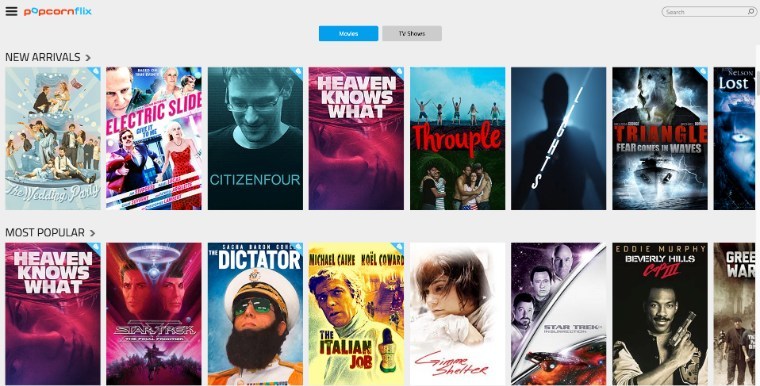
13. PopcornFlix

popcornflix

This free movie streaming website is owned by Screen Media Ventures. The website offers lots of public domain movies and original content. You can use this website to view content on any type of device without spending a single penny.

The website hosts thousands of free movies spread across multiple categories like drama, action, comedy, horror, etc. Here, you’ll also get many free TV shows and full National Geographic series catalog.

Availability: USA

What we like about PopcornFlix

  • Dedicated PopcornFlix kids app
  • Unique feature to add comments to movie sections and create GIFs

14. Hulu

free feature films hulu trial

Subscription-based streaming website Hulu is also here at your service even if you choose to opt for the trial account for 30 days. Additionally, you can opt for Spotify Premium Student with Showtime and Hulu for just $4.99/month. This way you get all three services for an unbeatable price. Apart from the movies, you can also spend some hours watching lots of free TV episodes. Hulu too has apps for Android and iOS. Again, Hulu isn’t available in all countries around the world. So, the usage of a VPN or proxy is required.

Availability: USA

What we like about Hulu

  • Spotify’s eligible student plan lasts for up to 4 years
  • Excellent cross-platform functionality

15. Vimeo

Just like YouTube, Vimeo also has a good collection of free movies. It goes without saying that the site offers a clean layout that makes it a great place for movie lovers who wish to enjoy free independent movies online and documentaries. There are lots of short movies available for your entertainment. You might not be knowing but Vimeo also offers an On-Demand content section where you can pay for TV shows and movies.

Availability: Everywhere

What we like about Vimeo

  • Just like YouTube, tons of free movies to watch
  • On-demand section for further viewing and download

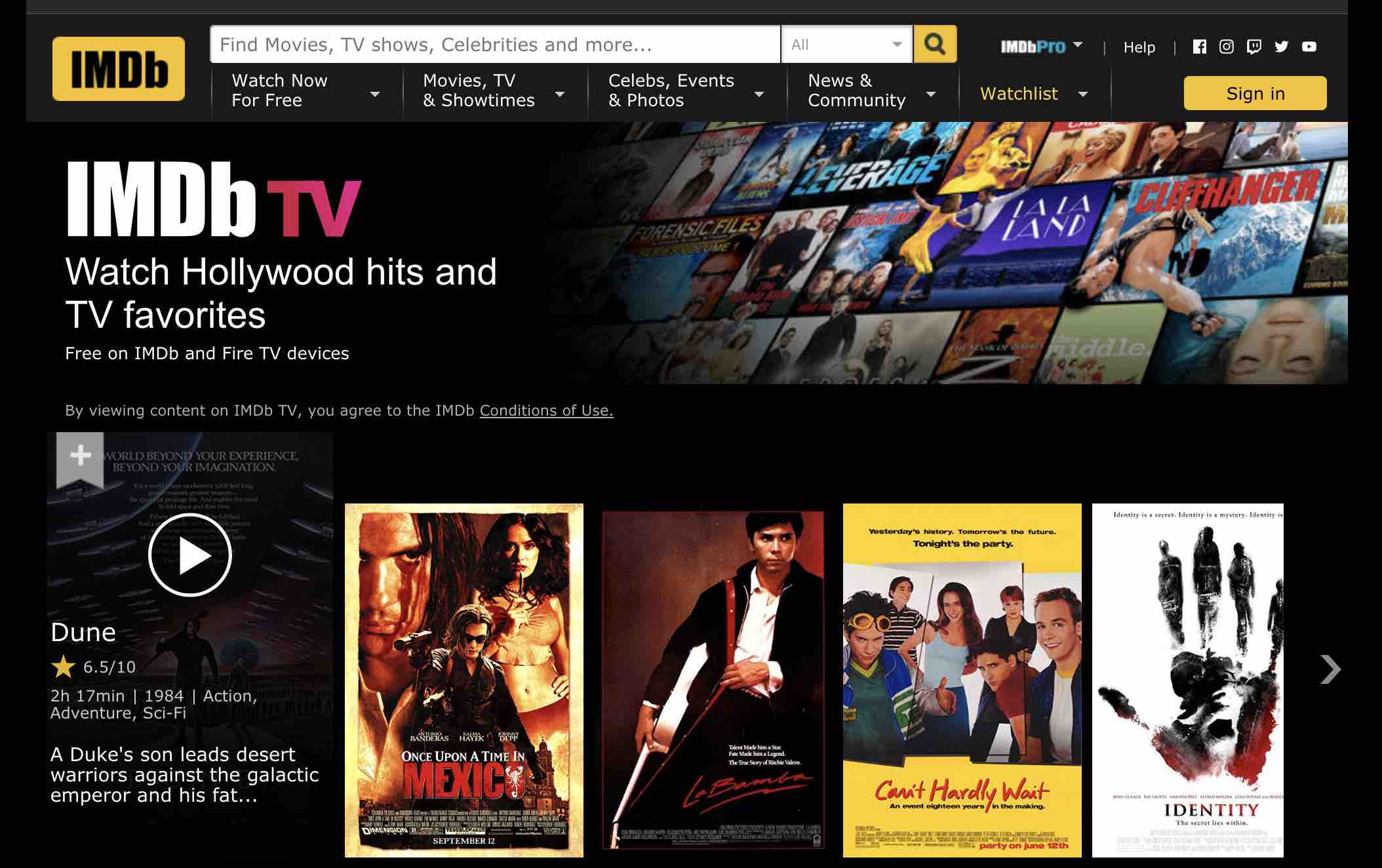
16. IMDb TV

imdb tv free movie download

Update: This service is now renamed as IMDb TV.

The latest addition to this list of movie streaming sites in IMDb Freedive. As IMDb is owned by Amazon, this service has been made available for free to all owners of Fire TV in the United States. The initial collection of free movies and TV shows is pretty impressive and the owners of the service have promised to add more content from time to time.

Users can also use Alexa to launch Freedive online streaming. To do so, one simply needs to say “Alexa, go to Freedive.” Some of the interesting titles available at launch are Midnight in Paris, The Illusionist, Memento, Born This Way, Quantum Leap, and more.

Availability: USA

What we like about IMDb TV

  • Fully free, ad-supported service with cross-platform availability
  • Advanced Title Search to find what you’re looking for

17. Yidio

Many of you might not be knowing that Yidio movie site’s full name is Your Internet Video. If I talk about the complete library of content available on Yidio, this online video guide contains more than 1 million TV shows and movies. The users can sign up on the website and add movies to the watchlist section for later viewing. This feature is very useful for maintaining your collection of favorite movies.

Moving on to the free part, you can choose the free filter at the top and categorize all the content at one place. At the right, there are options to sort content by popularity, date, and genre. Moreover, you also get the option to sort the free movies by R, PG-13, PG, G, NR, and NC-17 rating.

Availability: Everywhere

What we like about Yidio

  • Unique platform that gathers content from Amazon. Crackle, Hulu, Netflix, etc.
  • Yidio, short for Your Internet Video, is more of an online video guide with free and paid content all at one place

18. Legal Torrent Sites

Last but definitely not the least. There are tons of legal torrent websites out there that only share content that’s in the public domain. You can visit these safe torrent sites to download movies and watch them offline at your convenience.

Availability: Everywhere

As linked earlier in the article, you can also visit our list of best apps for streaming free movies we all.

Tip: Most of these websites don’t provide subtitle download functionality, which could be a major downside for many viewers. If that’s the case, you can head over to our list of best subtitle websites and download subtitles. You can also use VLC media player’s VLSub extension to automatically load subtitles of your choice.

Free Movie Download FAQs:

How to download free movies?

To download the movies from free websites, you need to access them using your desktop or mobile web browser. Different websites have different download options: some provide direct download links and some offer torrent links as well. For torrent links, you will need to install a separate BitTorrent client as well.

How to tell if a movie download website is legal?

There isn’t a particular test that you can perform to confirm that the site from which you’re downloading is providing legal movies. However, we’ve tested and made sure that all the sources in our list are 100% legal. Additionally, you can see if the free site is providing newly released movies and trying to earn money via tons of advertisements and VPN recommendations — these are some of the red flags for an illegal source.

Do I need a VPN for free movie download?

If you’re sure that you’re using a legal website to download movies, you don’t need a VPN or proxy to hide your online activity.

Is it legal to download movies/shows on Netflix?

If you have a paid Netflix subscription, you can go ahead and download content on your Android or iOS smartphone. For Windows, you need to download the official Netflix app. However, there’s no app available for watching/downloading Netflix on Mac.

The post 18 Free Movie Download Sites For 2021 [Legal Streaming] appeared first on Fossbytes.


18 Free Movie Download Sites For 2021 [Legal Streaming]
read more
9 Best AirPods And AirPods Pro Alternatives That You Can Buy In 2021

Best Airpods alternatives 2021

Apple is not only the biggest smartphone market share globally, but it is also the trendsetter for the entire world to follow.

Since the first AirPods came out back in 2016, hundreds of AirPods alternatives aka true wireless headphones have popped up in the market. And that “hundreds” does not include AirPods knockoff or AirPods-like headphones that are literally in abundance.

Cheap AirPods and Fake AirPods have become a thing now. From budget to premium, there is now an AirPods knockoff in every price segment.

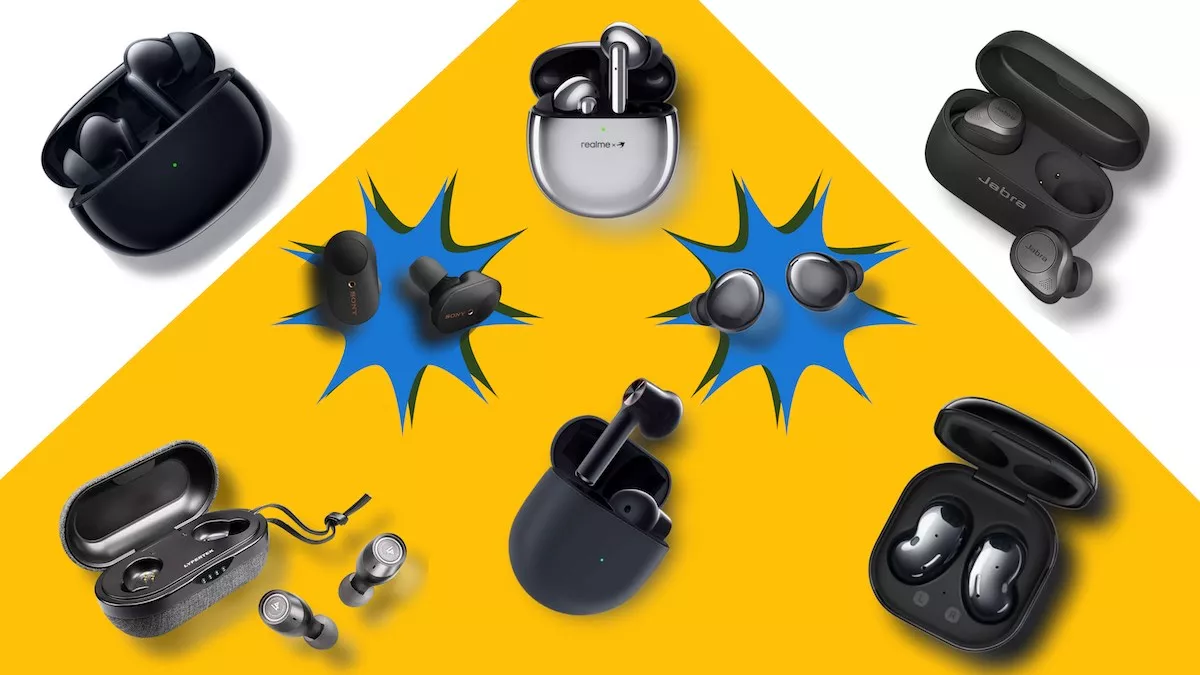
In this article, we will discuss some of the best AirPods alternatives as well as some of the best knock off AirPods that you can buy right now —

Best AirPods Alternatives 2021

  1. Samsung Galaxy Buds Live
  2. Jabra Elite 85t
  3. Samsung Galaxy Buds Pro
  4. Sony WF-1000XM3
  5. Realme Buds Air Pro
  6. OnePlus Buds
  7. Oppo Enco X
  8. TickPods 2 Pro+
  9. Lypertek Tevi

1. Samsung Galaxy Buds Live

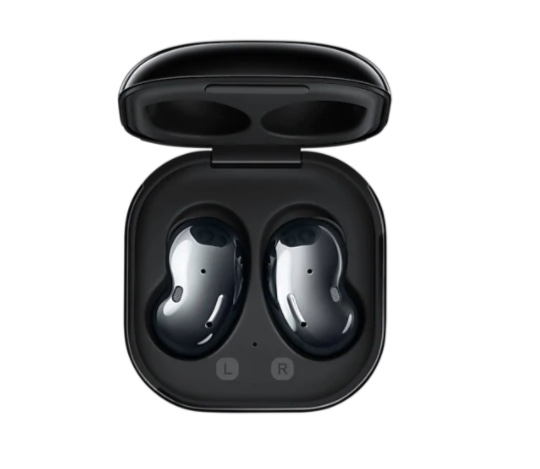
Galaxy Buds Live Airpods Alternative

If you prefer the open design of AirPods, where buds don’t go inside the ear, then Galaxy Buds Live is one of the best AirPods alternatives for you.

The Galaxy Buds Live comes in a bean-shaped design and offers excellent sound quality. Just like the AirPods, noise cancellation is not its strong suit.

However, the unique ergonomic design and glossy finish alone is enough to consider it as an AirPods alternative. Galaxy Buds Live pairs best with a Samsung Galaxy smartphone.

Specifications and Price
Weight 5.6 g
Battery Life 6 Hours with ANC
Active Noise Cancellation (ANC) Yes
Bluetooth v5.0
IP Rating IPX2
Price Rs. 11,990 (~ $164)

2. Jabra Elite 85t

Jabra Elite 85t AirPods Alternative

The Jabra Elite 85t is for people looking for the AirPods Pro alternative since it’s got that profound noise cancellation and excellent bass.

The Elite 85 has a “semi-open” design which means, unlike the AirPods Pro, the earbuds go only half into the ear. You can go for its predecessor Jabra Elite 75t if you are looking to completely shut down the outside noise.

The Jabra Elite can also be configured thanks to the Jabra Sound+ Android and iOS app. It also features multipoint Bluetooth pairing in which the AirPods alternative can be connected to two devices simultaneously. Overall, it’s one of the best AirPods Pro alternatives.

Specifications and Price
Weight 7 g
Battery Life 5.5 Hours with ANC
Active Noise Cancellation (ANC) Yes
Bluetooth v5.1
IP Rating IPX4
Price Rs 17,999 (~ $246)

3. Samsung Galaxy Buds Pro

best airpods alternative galaxy buds pro

The Galaxy Buds Pro is the latest true wireless earphones from Samsung. They don’t follow the AirPods Pro design, however they seal off the ear canal just about right. Noise cancellation and sound quality is top-notch.

Again, if you have a Samsung Galaxy smartphone, all the better. Because the AirPods alternative can only trigger Bixby with voice commands and nothing else. Overall, the Galaxy Buds Pro is one of the best AirPods alternatives in 2021.

Specifications and Price
Weight 6.3 g
Battery Life 5 Hours with ANC
Active Noise Cancellation (ANC) Yes
Bluetooth v5.0
IP Rating IPX7
Price Rs. 15,990 (India), $199 (U.S.)

4. Sony WF-1000XM3

Sony airpods alternatives

Sony WF-1000XM3 has the “Sony” sound, and therefore it is one of the best AirPods alternative that you can buy in 2021.

Thanks to the companion app, the sound quality can also be personalized for your needs. The noise cancellation is also quite good on the Sony WF-1000XM3. However, people have complained that the touch gestures are not as smooth and snappy as in AirPods.

Also, the call quality is not quite up to the mark. That being said, its luxury design and great sound quality are definitely worth checking out.

Specifications and Price
Weight 8.5 g
Battery Life 4 Hours with ANC
Active Noise Cancellation (ANC) Yes
Bluetooth v5.0
IP Rating No
Price Rs. 14,990 (~ $205)

5. Realme Buds Air Pro

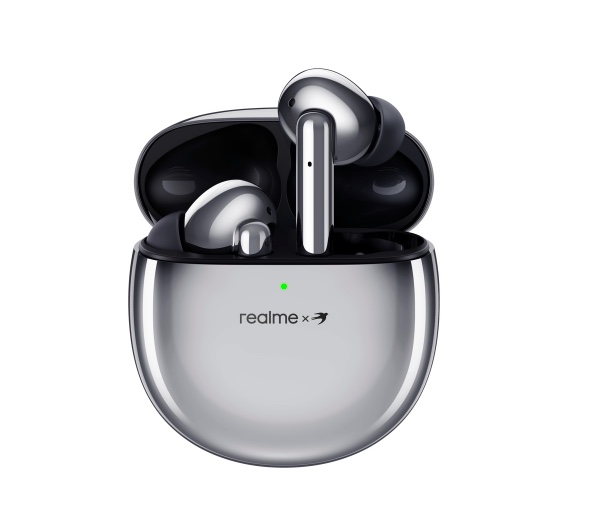
Realme Airbuds airpods alternatives

If you are looking for cheap AirPods knockoffs then Realme Buds Air Pro is the perfect buy. The $68 headphones come with Active noise cancellation, transparency mode, and bass boost.

Of course, it cannot be compared with the best AirPods alternative from Sony, Samsung and others. However, you will certainly be shocked to see what these Chinese smartphone manufacturers can do in the affordable segment.

Specifications and Price
Weight 5 g
Battery Life 5 Hours with ANC
Active Noise Cancellation (ANC) Yes
Bluetooth v5.0
IP Rating IPX4
Price Rs. 4,999 (~ $68)

6. OnePlus Buds

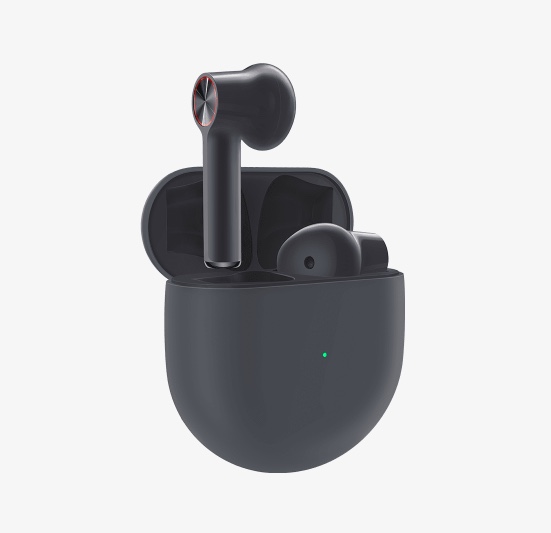
OnePlus buds best fake Airpods

Another best AirPods clone is from OnePlus, called OnePlus Buds. They pair well if you have a OnePlus smartphone and can be called the best AirPods alternative for Android.

While the $80 buds are packed with features and offer a whopping 7-hour battery on a single charge, they are not quite close to the real AirPods. In fact, they are pathetic when it comes to call quality.

However, it’s important to keep the price tag in mind. That’s because every AirPods alternative under the $80 price tag will have something or the other not as good as the gold standard i.e AirPods.

Specifications and Price
Weight 4.7 g
Battery Life 7 Hours
Active Noise Cancellation (ANC) No
Bluetooth v5.1
IP Rating IPX4
Price Rs. 4,990 (~$68)

7. Oppo Enco X

Oppo enco X airpods alternative

Oppo Enco X is Oppo’s attempt at coming up with the the cheap version of AirPods Pro. The AirPods alternative comes with two levels of active noise cancellation and brilliant sound quality.

The gesture control has always been good on Oppo’s earbuds and this one is no different. However, with ANC turned on, the battery takes a fall which you won’t see in higher priced AirPods alternatives.

Apart from that, iPhone users might face some issues since there is no iOS app. That being said, it’s still one of the best AirPods alternatives available on the market right now.

Specifications and Price
Weight 4.8 g
Battery Life 4 Hours with ANC
Active Noise Cancellation (ANC) Yes
Bluetooth v5.2
IP Rating IP54
Price Rs. 9,990 (~$136)

8. TickPods 2 Pro+

Ticpods 2 pro+ airpods knockoff

One of the best AirPods knockoffs in the premium price segment is the TickPods 2 Pro+. We have reviewed the TickPods 2 Pro so we know it’s a worthy AirPods alternative.

The TickPods 2 Pro+ comes with hand gesture controls, dual mic noise cancellation, volume slider, and supports aptX audio; all of these things are a rare find even in the premium wireless headphones.

The TickPods 2 Pro+ features the same AirPods 2nd gen design, so do not expect the best noise cancellation. Also, the battery backup is on the lower side with 4 hours of playback on a single charge.

Specifications and Price
Weight 4.4 g
Battery Life 4 Hours
Active Noise Cancellation (ANC) No
Bluetooth v5.0
IP Rating IPX4
Price Rs 13,000 (India), $118 (U.S.)

9. Lypertek Tevi

lypertek tevi best AirPods alternatives

The $95 Lypertek Tevi has received a lot of acclaim for its audio quality for its price. The AirPods alternative doesn’t feature noise cancellation, but its design adequately isolates you from ambient noise.

The headphones support aptX, a scarcely available feature at this price point. Also, Lypertek promises a whopping 10 hours of continuous playback and a total of 70 hours.

The microphone quality is not up to the mark. Regardless, at this price point, it’s truly one of the best AirPods alternatives of 2021.

Specifications and Price
Weight
Battery Life 10 Hours
Active Noise Cancellation (ANC) No
Bluetooth v5.0
IP Rating IPX7
Price Rs 6,900 (~$95)

So these were some of the best AirPods alternatives that you can buy this year. Let us know if we left any of the best knock off AirPods in the comments section below.

The post 9 Best AirPods And AirPods Pro Alternatives That You Can Buy In 2021 appeared first on Fossbytes.


9 Best AirPods And AirPods Pro Alternatives That You Can Buy In 2021
read more
How To Export WhatsApp Chats To Telegram On Android And iOS?

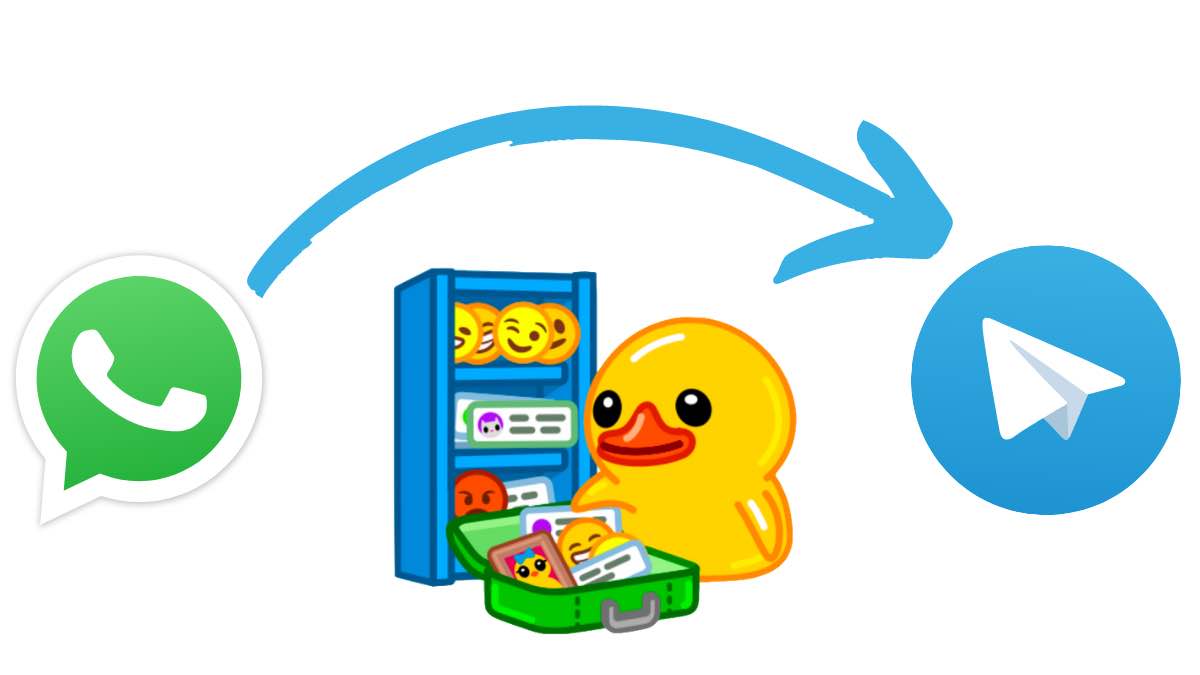
How to transfer WhatsApp messages to Telegram

WhatsApp’s recent update to its privacy policy has resulted in a lot of WhatsApp users migrating to other best messaging apps. Telegram is one such app and you can now export your WhatsApp chats to Telegram.

Telegram added the feature in its latest update. This means that when you switch to Telegram from WhatsApp, you won’t lose any of your chats. You can also import chats from Line, and KakaoTalk. Here’s how to move your WhatsApp chats to Telegram.

How To Move WhatsApp Chats To Telegram on iOS?

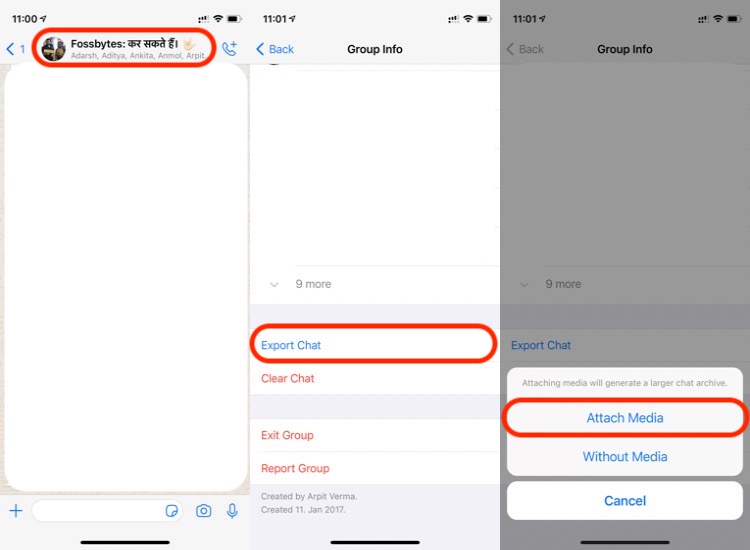
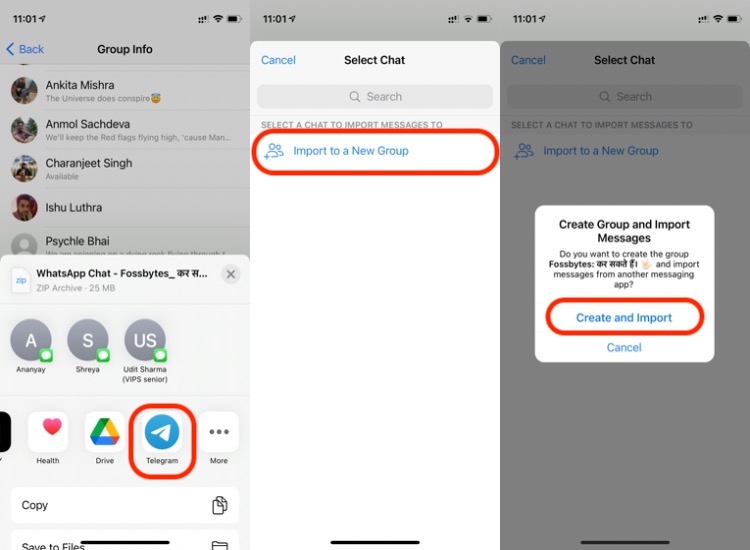
  1. Select chat to export

    Open a group/contact chat and go to group info. Scroll to the bottom and select export chat > Choose “attach media” if you want to export all photos and videos as well.1. how to export WhatsApp chats to Telegram on iOS

  2. Export WhatsApp chat to Telegram

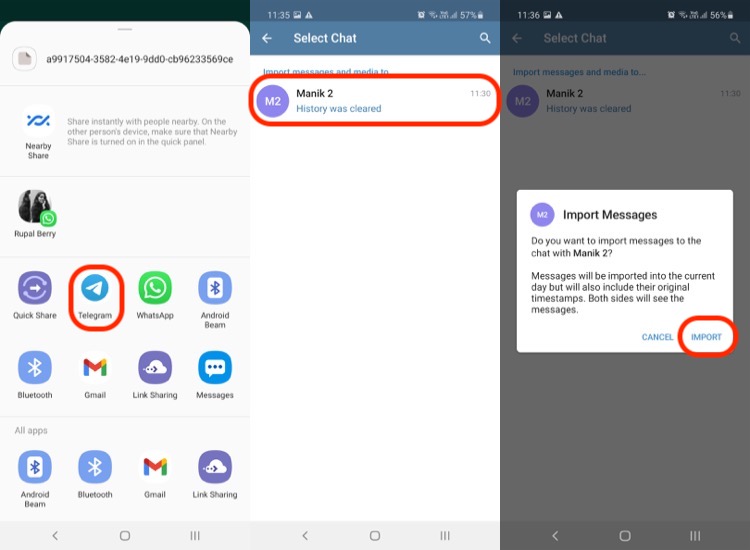
    Now select Telegram from the share menu > Import to a new group > Create and import. You can also export the chat to an existing group on Telegram.2. how to export WhatsApp chats to Telegram on iOS-2

Export WhatsApp Chats To Telegram on Android


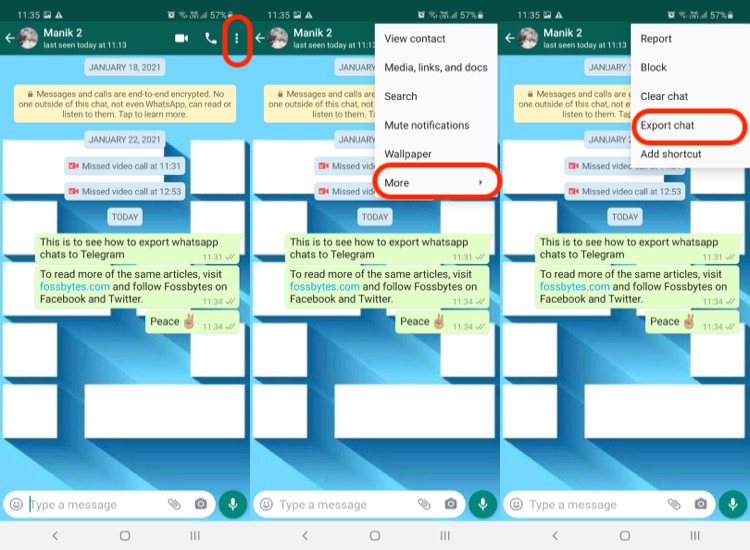
  1. Select chat to export

    Open a group/contact’s chat, tap on the three-dot menu > More > Export chat.3. how to move whatsApp chats to telegram on Android 1

  2. Move WhatsApp chat to Telegram

    Select Telegram from the share window > Find the contact on Telegram > Import4. how to move whatsApp chats to telegram on Android 2

New Telegram Features

With the latest update, Telegram has refined some of its other features as well. These include an improved music player within the app. You also get adjustable volume for voice chats which is a handy feature.

Other than that, you get Welcome stickers to start a new conversation on Telegram. The latest update also includes improved TalkBack and VoiceOver features.

What Could Improve

MTProto protocol on Telegram

While it’s impressive to see Telegram letting you import chats from other platforms, we’d like to see this happen on all platforms. It’s a good move and it simply means we can keep chats backed-up on a separate platform where it remains encrypted and secure.

However, there’s no way to export all the chats at the same time so you can’t use it as a full-fledged backup. We’d like to see WhatsApp, Telegram, as well as Signal offer full-import capability in future updates. That way, people will have more choice and less effort in switching between messaging services.

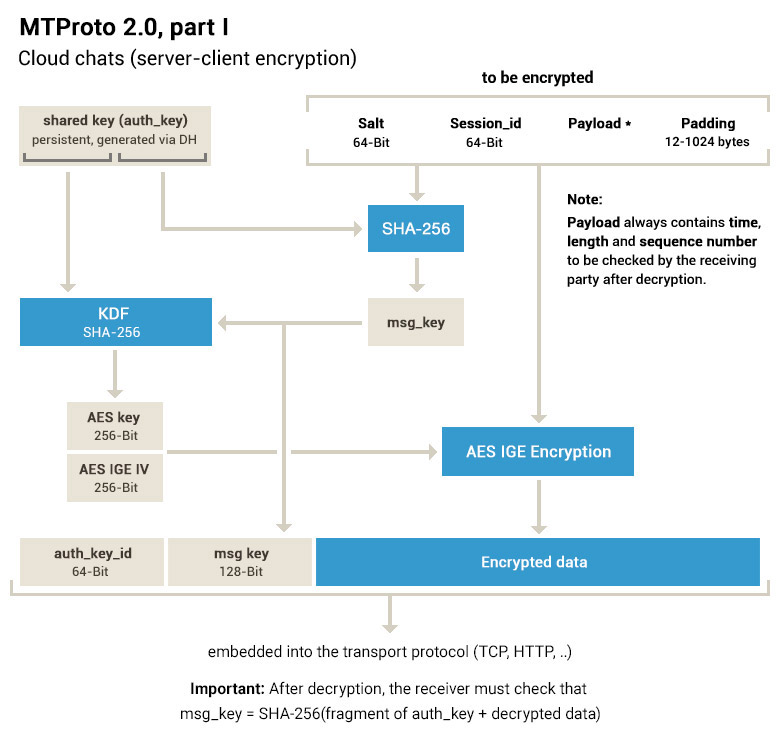
Another thing that’s different about Telegram is the encryption protocol used by the platform. It uses the MTProto Mobile Protocol, which is somewhat more prone to data leaks if a hacker manages to decrypt the current key. This makes it a weaker encryption protocol compared to Signal or even WhatsApp.

The post How To Export WhatsApp Chats To Telegram On Android And iOS? appeared first on Fossbytes.


How To Export WhatsApp Chats To Telegram On Android And iOS?
read more
How To Take Screenshots On Snapchat Without Them Knowing?

how to screenshot on Snapchat without them knowing

We all know how popular and important the photo-sharing app Snapchat has become in our lives. Not sharing a snap while we are out or eating at a fancy restaurant ain’t an option. This “Snapchatting” spree also includes times when we want to keep other’s snaps without letting them know.

One obvious question to this is, “Can you screenshot Snapchat without them knowing?” We have a straight-up YES to this. Hence, I am here to tell you methods to take a screenshot on Snapchat without letting anyone know about the sneaky task you want to do.

How To Take Screenshots On Snapchat Without Them Knowing? (Android and iOS)

1. Recording using another smartphone

The easiest Snapchat screenshot hack is to use another smartphone to record a video of a Snapchat video or take a picture of a Snapchat image.

Following this, you can edit the photo or the video taken and can finally keep a copy of others’ Snapchat Stories and they won’t even know of it.

2. Using the in-build screen recorder

This is another way to screenshot a Snapchat story without them knowing. You just have to use the inbuilt screen recorder in Android and iOS.

Android

Android 11 users will find the screen recorder in the Quick Settings panel.

  • Just swipe down on the screen to access the notification panel.
  • Swipe again to get to the Quick Settings panel.
  • Now, swipe right on the panel until you see the Screen Record icon.
  • Tap on it to get started.

You can now capture a screenshot of the Snapchat story from the video recording.

iPhone

For iOS, the inbuilt screen recorder feature can easily help you do that. You just have to enable the feature from the Control Center by tapping on the option. If the feature isn’t available in your Control Center, you can add it by following a couple of simple steps:

  • Go to Settings and find the Control Center option.
  • Tap on it and select the Customize Controls option.
  • Following this, just add the screen recorder option and you are done.

3. Using a screen recorder app

You just have to install any screen recorder app for Android out of the various available on the Google Play Store. For more clarity, you can check out our list of the best screen recorder apps and download the ones you like.

3. Using Google Assistant for Android devices

This is yet another hack to secretly screenshot Snapchat on Android with the help of Google Assistant. The steps are pretty easy:

  • Open up Snapchat and the snaps you want to save to your gallery.
  • Call out to Google Assistant by either long-pressing the home button or with a simple “OK, Google.”
  • Ask the digital assistant to take a screenshot verbally or by typing and the work gets done without anyone knowing about it.

However, there’s one downside; there ain’t an option to directly save the screenshot to your gallery and instead, you will be provided with an option to share it with other platforms. You have to send it to your email or any other platform, and save it from there.

4. Using airplane mode

This method is easy and doesn’t require you to do a lot. Here are the steps you have to follow:

  • Open Snapchat to make sure all the snaps are loaded (don’t view them though!)
  • Now, turn off the Wi-fi, mobile data, and even Bluetooth. After this, turn on the airplane mode.
  • Once you have ensured that your device doesn’t have internet connectivity, just open up Snapchat.
  • Just open the snap you want to take a screenshot of, take a screenshot, and it is done. After 30 seconds or a minute, turn on your internet connection and no one will know what you just did.

5. Using third-party apps

Much like third-party apps to save a WhatsApp Status, there are some to save a Snapchat snap without anyone knowing. You can download them from the Google Play Store.

There are various apps for the purpose such as SnapSaver (Android) and Sneakaboo (iOS) and there are pretty simple steps to do the same.

SnapSaver

For this, you just have to download the app and open it.

  • Now, you have to select from the desired options (Screenshot, Screen Recording, Burst Screenshot, and Integrated) and head to Snapchat.
  • Open the required snap that you want to save, tap on the SnapSaver camera icon that will appear on your screen, and a screenshot will be taken without the person getting notified about it.

Sneakaboo

For this app too, you have to install it and log in with your Snapchat credentials. All the new Snapchat Stories will appear on the app and you just have to take their screenshot when they play. This won’t notify the other user about the screenshot as your work gets done.

6. Using the Mirror feature on Android

This is another Snapchat screenshot hack, but it requires some work. You have to use the screen mirroring feature (can be accessed from your smartphone’s Settings) so that your device is cast on an external device such as a smart TV.

Once this is done, you will have to open up your Snapchat and use another device to record the Snapchat video or photo. After a couple of edits, you will get yourself someone else’s Snapchat Story and they won’t even know about it.

How To Screenshot Snapchat Without Them Knowing? (Mac)

There is a simple trick to screenshot on Snapchat without them knowing. You just have to enable the QuickTime Screen Capture to perform the task. For this:

  • You just have to connect your iPhone to your Macbook and open the QuickTime Player app.
  • Tap on the file option and then the ‘new movie recording’ option.
  • Select any of the various recording options available and select your iPhone as the movie recording output that will help mirror your iPhone onto the Mac.
  • Once the setup is done, you have to hit the record button, open Snapchat and you will be able to screenshot Snapchat without notification.

Take Screenshot On Snapchat Without Them Knowing In Easy Steps

I hope my aforementioned simple hacks will help you take a screenshot on Snapchat without the other person knowing of it.

As a reminder, we don’t endorse the act for any cruel intention but just for fun. You have to ensure you maintain others’ privacy and don’t cross the line!

FAQ

Can you tell if someone screenshots your snapchat?

Snapchat informs users if someone took a screenshot of their snap. However, there are many ways to take a screenshot on Snapchat without others knowing.

Is it illegal to screenshot a Snapchat story?

It is not illegal to take a screenshot of a Snapchat story. However, make sure to have a good reason behind taking a screenshot of the person’s story.

The post How To Take Screenshots On Snapchat Without Them Knowing? appeared first on Fossbytes.


How To Take Screenshots On Snapchat Without Them Knowing?
read more
Playing Grand Theft Auto Inside A Neural Network’s Hallucination? It’s Possible!

Ever imagined what a Neural Network's hallucination would look like? The post Playing Grand Theft Auto Inside A Neural Network’s Halluc...