In July last year, Canonical, the company behind the most popular Ubuntu Linux, teamed up with Google to enable Flutter UI toolkit support for the Linux desktop.
Subsequently, Google released Linux alpha for Flutter, which lets you build applications for mobile, web, and desktop from a single codebase with a native interface and app performance.
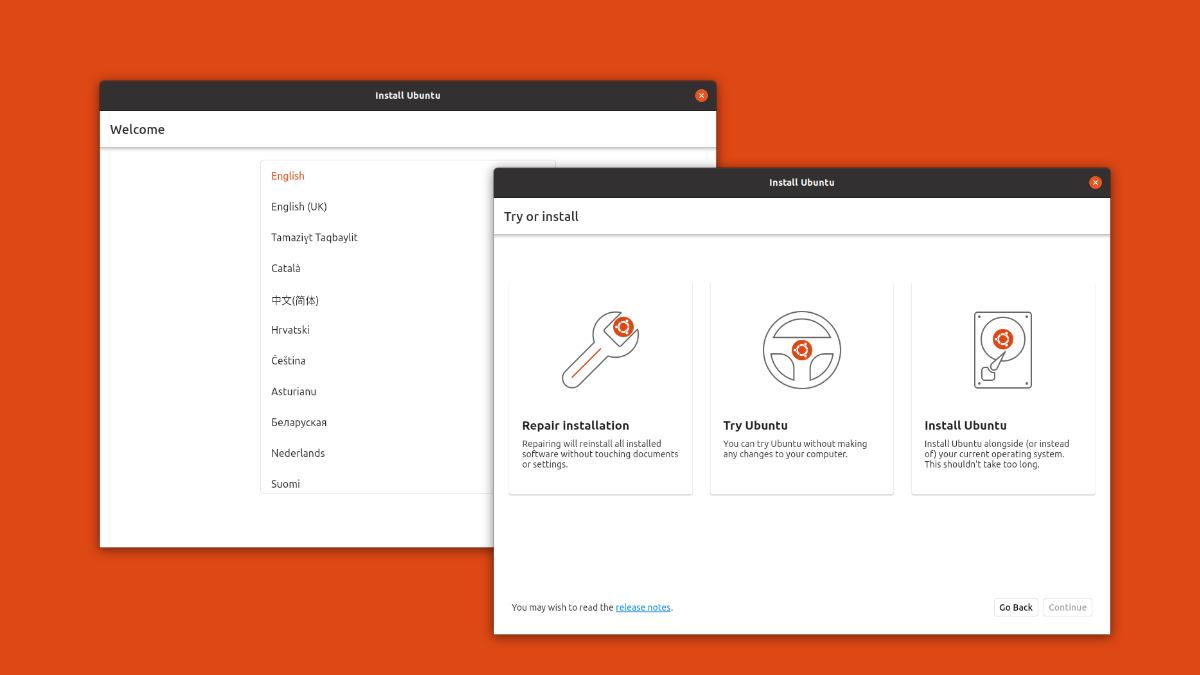
Now leveraging the partnership with the Flutter team, the Ubuntu desktop team has also officially started using Flutter to build the user interface of its upcoming brand new desktop installer.
As Martin Wimpress, Ubuntu Desktop lead and head of the Ubuntu MATE project, says, the team has planned to have a preliminary version ready for testing in Ubuntu 21.10, which will arrive in October 2021.
Since the new Ubuntu desktop installer will eventually replace the current Ubiquity installer in the next LTS release i.e., 22.04, the developer has also decided to make Ubiquity remains available in Ubuntu archive for official flavours, remixes or derivatives.
Why A New Ubuntu Desktop Installer?
As you may know, Ubuntu Server has a new installer called Subiquity, which uses Curtin.
While Ubuntu Desktop installer Ubiquity dates back to 2006 and it has not received any significant feature development for years and due to its legacy, devs find it hard to maintain.
Hence, the team plans to consolidate the installer for both server and desktop on common technologies. This way it can deliver a consistent and robust installation experience across the Ubuntu family distributions.
Additionally, it can also help the development team to focus on maintaining a single code base and add more desirable features easily.
Rarely will you ever need to restart your iPhone, but if you’re reading this article, that means the time has come.
Now turning off the iPhone 11, iPhone X, or iPhone 12 is a little different from previous generation models that still have the Home button and the Touch ID.
For instance, you can turn off the iPhone 8 by pressing and holding the sleep button and dragging the power off slider. But the same trick cannot be used to turn off the iPhone 11.
Here are three ways to turn off the iPhone 11 styled models, i.e., iPhones that feature a notch, such as the latest iPhone 12, iPhone X, and iPhone XR.
How to turn off the iPhone 11 styled models?
Method 1
This is the easiest and most common method to restart iPhone 11 styled models. Here’s what you need to do:
Long press and hold any one of the volume buttons and the sleep button simultaneously.
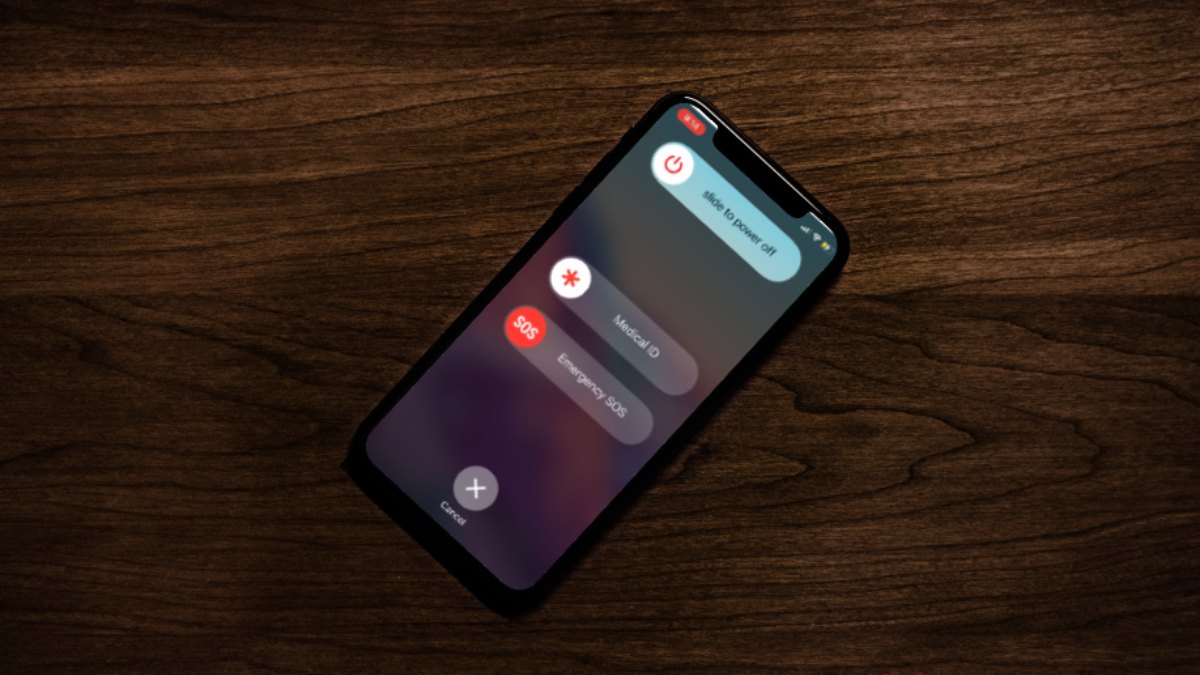
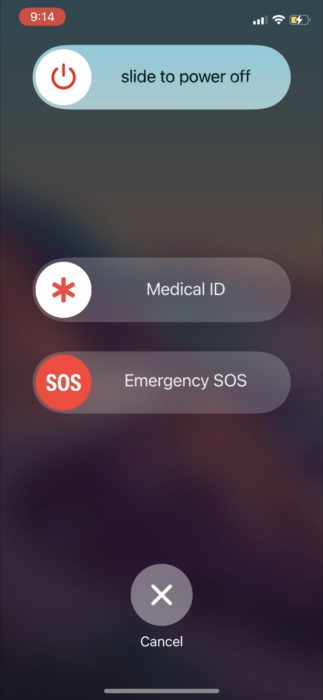
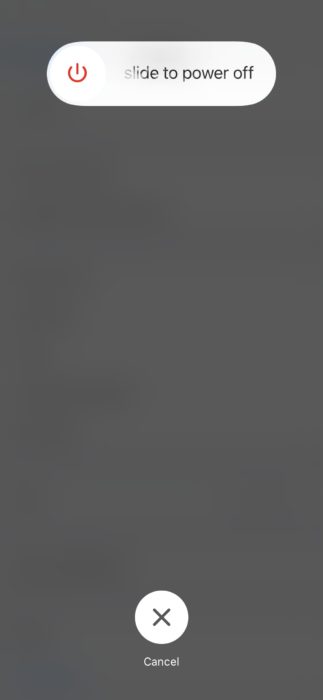
You will see a power off slider on the screen.
Drag the slider to the right to turn off the iPhone.
To turn the device back on, long press the sleep button until you see the Apple Logo.
Method 2
If the iPhone is damaged and the side buttons are out of service, however the screen is intact, here’s what you need to do to turn off your iPhone X and above.
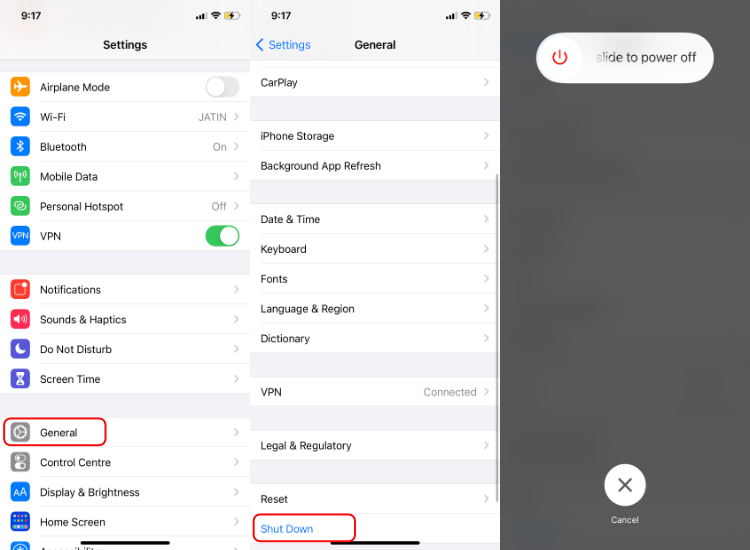
Go to the iPhone settings
Scroll down and tap on General
Tap on the Shut Down button located at the bottom
Drag the power slider to the right to turn off the iPhone.
Method 3 (Frozen screen fix)
If you have an iPhone with a cracked screen or the touch is not working (frozen screen), you can follow this method to restart your iPhone 11 styled model.
Press the volume up button
Press the volume down button
Long press and hold the Sleep button. You will now see the Power off slider screen
Keep holding the button until the screen turns off
This method will also turn out to be effective in cases where your iPhone is unresponsive and you need to force shut your iPhone, although it is unlikely that will happen.
You have turned off the iPhone. Now, if you want to restart your iPhone 11, iPhone X, or iPhone 12, long press and hold the sleep button (button on the right) until you see the Apple logo.
So, this is how you can restart your iPhone X and above. Note that iPhones work in a way that frequent restart is not required. However, if it comes to that, you now know how to turn off the iPhone 11, iPhone 12 or the 2017’s iPhone X.
In terms of first-person games, the Halo franchise is one of the favorites. That’s why millions of Xbox enthusiasts are waiting for the release of Halo Infinite, the upcoming FPS game from 343 Industries. Xbox Game Studios announced the game in 2018, and since then, players are eager to hear anything on the game’s development.
Well, in this post, we’ve mentioned every important detail about Halo Infinite, including its release date, story, etc. So, let’s dive right into the details without wasting any more time.
Halo Infinite Release Date
Xbox Game Studios confirmed that Halo Infinite would release in late 2021. Initially, Xbox wanted to release the game in November 2020. However, in August 2020, the studio delayed its release without providing any particular release date.
Gameplay: Will Halo Infinite Be Open-World?
According to the developers, Halo Infinite isn’t fully an open-world game; however, players can still freely explore previous areas. Of course, moving forward in the story will unlock new areas, but players can choose to go back and explore the massive world.
Obviously, there will be a wide range of futuristic weapons in Halo Infinite. Other than that, players will get their hands on interesting tech that can be helpful in combat. For instance, Halo Infinite will introduce grapple hooks, which can enhance players’ combat experience.
Platforms: Will Halo Infinite Be On PC?
Fortunately, Halo Infinite will release for Microsoft Windows. Other than that, the first-person title will launch for Xbox Series X/S and Xbox One.
Halo Infinite Multiplayer
There will be a Halo Infinite Multiplayer mode for PC, Xbox Series X/S, and Xbox One. What’s more, is that the Multiplayer mode will be completely free-to-play and support up to 120fps on Xbox Series X.
Will Halo Infinite Have Battle Royale?
Unfortunately, it’s confirmed that Halo Infinite will not feature a battle royale mode.
With the latest trend of battle royale games like PUBG, Apex Legends, and COD Warzone, there were rumors that Halo Infinite will feature a similar game mode. However, 343 Industries shut down the rumors by saying that it “isn’t planning” on including a BR mode for Halo Infinite.
Story: Does Halo Infinite Takes Place After Halo 5?
Yes, Halo Infinite takes place two years after the events of Halo 5. Master Chief will return to Halo Infinite to save humanity from a new threat.
The two-year gap in the story means players will discover many new things in Halo Infinite. Also, the time-gap between the two Halo games will be perfect for new players as they won’t feel lost in the story. However, 343 Industries also confirmed that Halo 5’s ending and Halo Wars 2 influenced the Halo Infinite’s campaign storyline.
Is Halo Infinite The Last Halo?
Yes, you could say that Halo Infinite is the last standalone Halo game for the foreseeable future. It further means that you won’t probably see another Halo game for years.
However, that doesn’t mean Halo won’t continue; 343 Industries confirmed that the studio would continue Master Chief’s story through updates. Similar to games like Destiny 2 and Warframe, Halo Infinite world will expand through numerous DLCs.
Pre-Order
Right now, Halo Infinite Pre-order isn’t available. However, Xbox Game Pass will feature the game on the first day of its release. So, you can become an Xbox Game Pass member if you want to play the game on the first day.
So, that’s all we know about Halo Infinite as of now. We’ll update this post as soon as we hear some news on the Halo Infinity release date or its development.
Realme is now adding more devices to the list of smartphones that are eligible for the Android 11-based Realme UI 2.0 in India.
The Realme UI 2.0 beta build is now available for Realme 6, Realme C12, Realme C15, Realme X2, Realme X3, and Realme X3 SuperZoom. It will first be available to owners of Realme 6.
How to get Realme UI 2.0 Android 11?
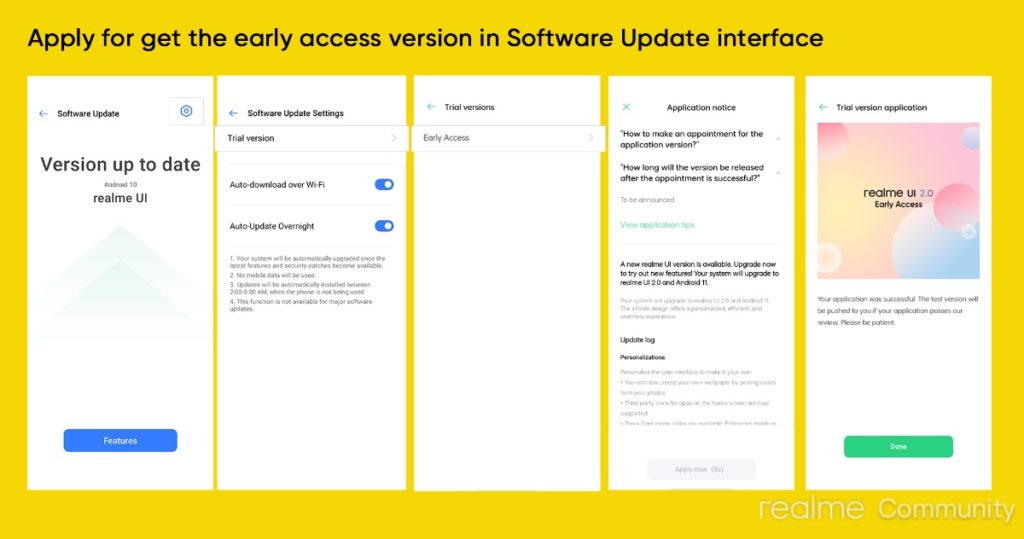
Thanks to the Realme UI 2.0 Early Access Program, eligible Realme device owners can get the Android 11 update on their device right now.
Go to Settings > Software Update
Tap on the Software update Settings icon
Tap on the Trail version > Early Access > Apply Now
Submit your personal details and tap on Done
Wait for the OTA update to arrive on your device
Note that only limited slots are available. You may or may not get the Realme UI 2. 0 update depending upon the availability. Also, make sure your Realme device has more than 5GB of free storage.
Like any beta update, the Realme UI 2.0 beta update also comes with several bugs and issues. Some known issues are swipe-up gesture lag and screen stuck in some scenes.
The Chinese smartphone manufacturer released the Realme UI 2.0 back in September 2020. Like previous upgrades, the latest Realme Android 11 update picks up several features from Oppo’s recent ColorOS 11 update.
Realme UI 2.0 Android 11 comes with massive customization features such as adding third party icons, changing accent colors, new Always-On display customizations, and more. The update also comes with Android 11 new privacy features and three Dark Mode options to choose from.
If you’re a movie buff, chances are you might have used subtitles to watch movies that are unavailable in your native language. The debate between subtitles and dubbed is eternal and never-ending. A lot depends upon users’ personal choices whether to watch a dubbed movie or add subtitles to movies and TV shows.
There are several websites on the internet offering subtitles in multiple languages for movies and shows. Most of the subtitles available on such websites are fanmade or ripoff from copyrighted content. The process of generating subtitles by fans is called “fansubbing.”
The term is quite popular amongst anime lovers. The role of a fansubber involves translation, subtitling, and distributing the subtitles. Since subtitles are not generally offered by the copyrighted content owners, they fall under the category of pirated content.
If you’re wondering whether subtitles are illegal to use, we have provided you a answer to it.
Are Subtitles Illegal? Apparently, Yes.
According to a court order passed by the Amsterdam District Court in 2017, subtitles are illegal unless created and distributed after obtaining permission from the original content holder. Anyone generating subtitles without obtaining the required permission could be punished under copyright infringement, as per the court order.
Similar legal barriers could be in place in other regions as well. Thus, subtitles are illegal and could land you behind bars, or you’ll need to pay a fine for using illegally generated subtitles.
For a long time, fansubbers have received harsh criticism from anti-piracy groups and copyright content creators. BREIN, an anti-piracy group hailing from the Netherlands, has been at the forefront of the fight against fansubbers and subtitles. The group has forced several subtitles creators to shut down their shop.
However, in 2017, a group called “Free Subtitles Foundation” (Stichting Laat Ondertitels Vrij – SLOV) decided to fight BREIN in the Netherland court against its campaign targeting fansubbers.
Surprisingly, the court sided with BREIN and issued an order stating that subtitles are illegal if generated/circulated without permission from the original content creator.
After the decision, BREIN director Tim Kuik said, “With this decision in hand it will be easier for BREIN to maintain its work against illegal subtitlers and against sites and services that collect illegal subtitles and add movies and TV shows from an illegal source.”
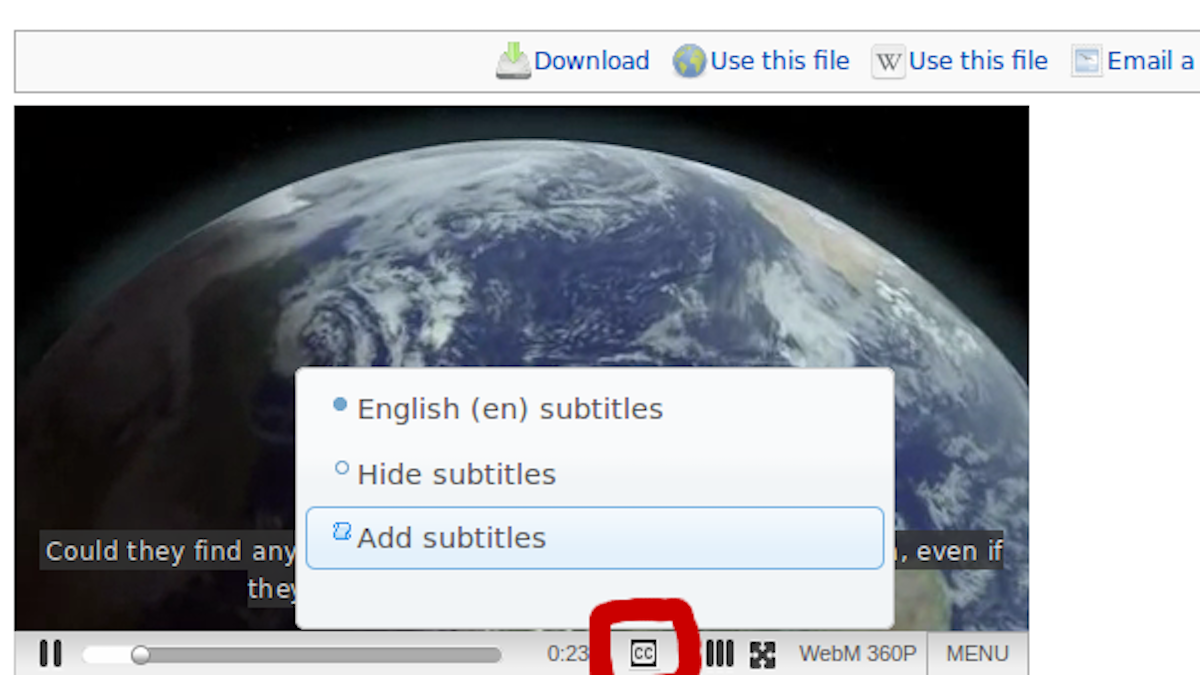
Everything is not gloomy though, Netflix and Youtube encourage publically sourced subtitles to make it easy for deaf users and those who are keen on watching foreign language shows and movies.
But, the order by the Dutch court very well means that subtitles are indeed illegal and it could have implications for fansubbers around the world.
The iconic SUV ‘Tata Safari’ by Indian automaker Tata Motors is going to relaunch in the first week of February 2021.
For many automotive enthusiasts, Tata Safari holds a special spot in their hearts. Along with this, Tata Motors has significantly excelled in automotive technology in the past few years.
For the same reason, the anticipation among the masses is now even greater for its comeback.
Though the 2021 Tata Safari is set to launch next week, the automaker has already revealed its specs and details on its official website.
Hence, let’s discuss why it’s worth considering if you are planning to buy Tata Safari in 2021.
Before we move ahead, let me tell you that Tata Safari is an extended version of Tata Harrier. Also, prior to the announcement of Tata Safari, it was being advertised as Tata Gravitas.
Anyway, coming back to the topic. Here are the reasons 2021 Tata Safari is one of the best SUVs on the market.
1. Built On Land Rover Platform
Tata Safari is built on OMEGARC architecture which is derived from the D8 platform of legendary SUV Land Rover.
The structure itself ensures the topmost built quality among the SUVs of this segment. In addition, it’ll also enhance the overall ride quality.
2. Sheer Performance Of An SUV
Image: Tata Motors
The 2021 Tata Safari will get its power from the Kryotec 2.0-liter Turbocharged BS6 Diesel engine. It’s capable of churning out 167.6 BHP and 350 Nm of torque, making it one of the most powerful engines.
It’s the same engine that powers its not so little brother Tata Harrier.
The engine meshes with six-speed automatic transmission. One of the most impressive features is that there are different driving modes based on your mood as well as road conditions.
You can choose different modes depending on the terrain. For example, you can choose between Normal, Rough, and Wet mode based on driving conditions.
Similarly, you can shift on to Sports, City, or Eco mode depending on your mood.
3. Luxurious And Comfortable Interior
Being the flagship car in the portfolio of Tata Motors, Safari received top-notch interior detailing.
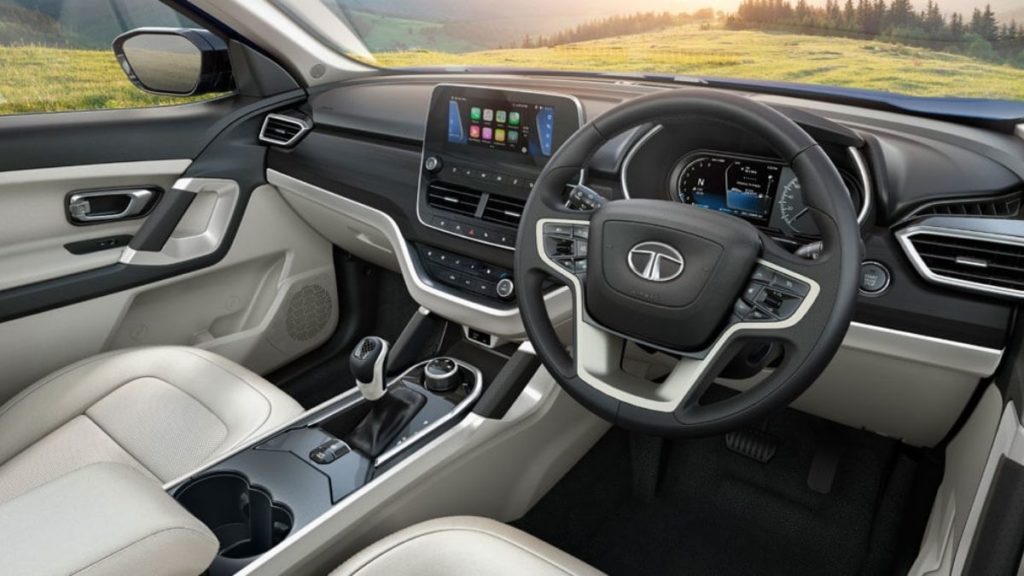
One of the most striking features is its signature oyster white interior color theme. Along with that the seats are wrapped in white perforated leather to enhance its premium appeal.
Moreover, the Ashwood dashboard, floating display, two captain seats, iRA- the vehicle connectivity technology, 9 JBL speaker sound system, and best in segment panoramic sunroof altogether makes a great package.
Also, the multiple utility spaces and charging port in each row makes the 2021 Tata Safari more comfortable than ever before.
4. Spacious: Feel More Room Inside Cabin
Image: Tata Motors
If we talk about the interior space, then both front and second-row seem to have ample space. The third row as usual in all SUVs of this segment is a bit congested, however, it looks sufficiently comfortable for short trips.
Also, the new Safari is a bit longer as well as wider, which also confirms the extra space. Here’s a comparison of the dimensions of the Tata Safari Storme (old model) and the new one.
S.No.
Dimensions
2021 Tata Safari
Tata Safari Storme (old)
1.
Length
4661 mm
4655 mm
2.
Width
1894 mm
1855 mm
3.
Height
1786 mm
1922 mm
5. Paramount Safety Of 2021 Tata Safari
Needless to say, Tata Motors is the safest automaker in India. The entry-level car Tata Tiago of the automaker holds a four-star safety rating in Global NCAP crash tests.
Although the new Tata Safari is not crash-tested yet, we are pretty much sure that it’ll score no less than five stars.
Anyway, the 2021 Tata Safari is equipped with ESP with 14 additional functionalities.
Apart from this, features like six airbags, all-disc brakes, hill-hold and hill descent control, TPMS, child seat ISOFIX, auto-dimming inside rear-view mirror, and much more make it one of the safest SUVs in India.
What’s The Price Of 2021 Tata Safari?
The price of Tata Safari is yet to be announced on February 4th, 2021 at its launch event. However, we expect that it would be somewhere between Rs 14.99 lakh and 22 lakh (ex-showroom).
Anyway, we’ll update it as soon as the automaker announces it.
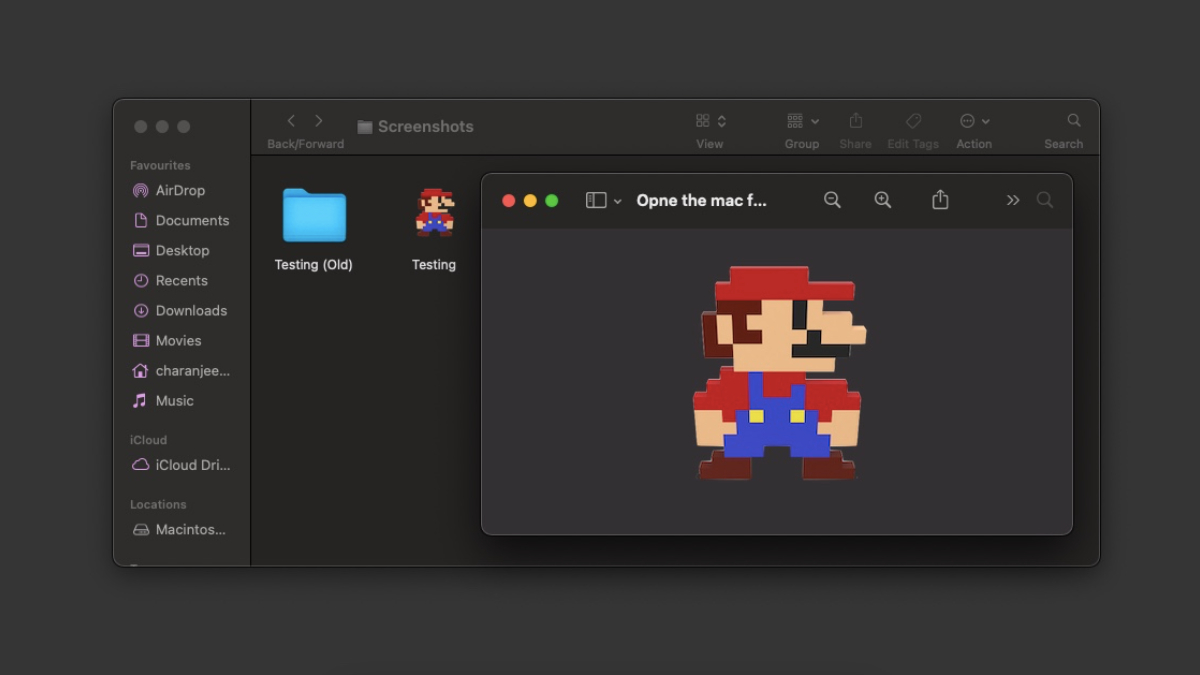
I am sure you must have created several folders on your MacBook, but do you know how to change folder icon on Mac? The reason why I ask this is that our brains can decode visual information 60,000 times faster than text. So it’s fine if you have given complex names to your folders to differentiate them from each other.
However, changing the folder icon on your Mac or even giving it a different color code can help you recognize a folder instantly. Also, don’t you get bored of the standard blue colored folders? While we are at it, let’s change the file icon on your Mac as well.
How to change the folder or file icon on your Mac?
Download the image that you will use as the new folder or file icon.
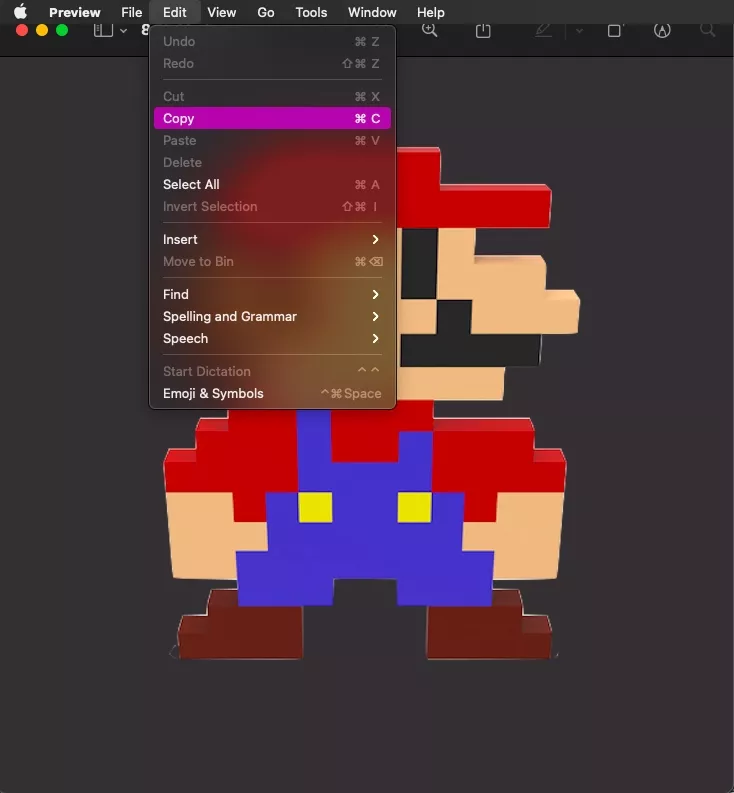
Double click on it to open the image in Preview.
Go to Edit > Copy or press the keyboard shortcut Command-C to copy the image.
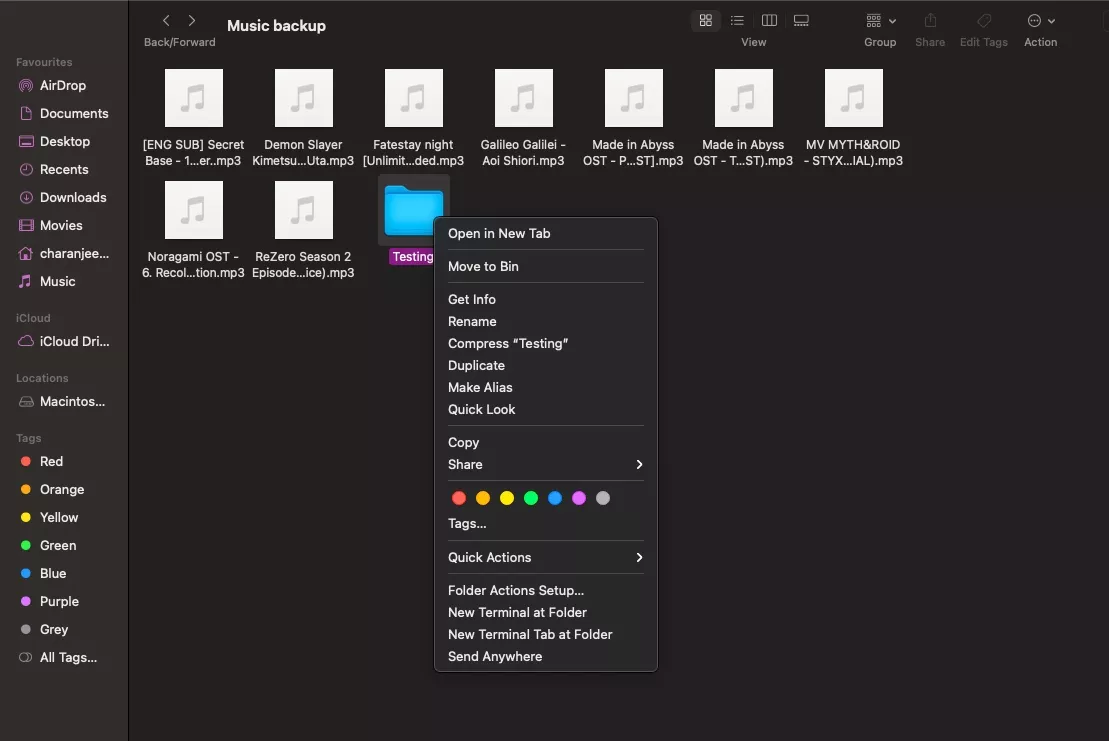
Go to Finder and select the folder or file whose icon you wish to change.
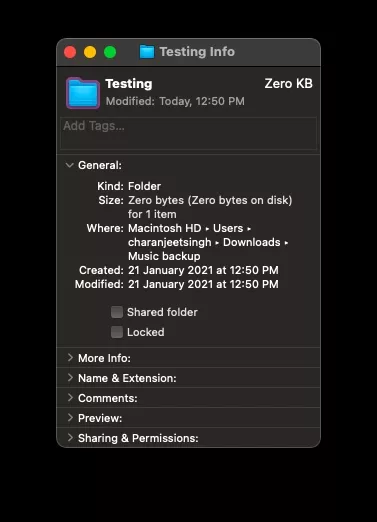
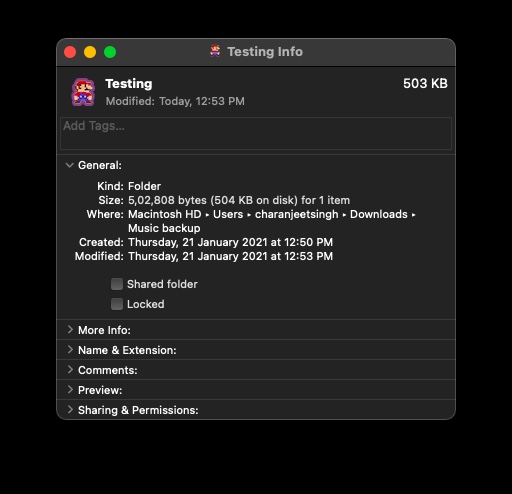
Right-Click on it and select Get Info.
Click on the icon at the top left of the Info panel.
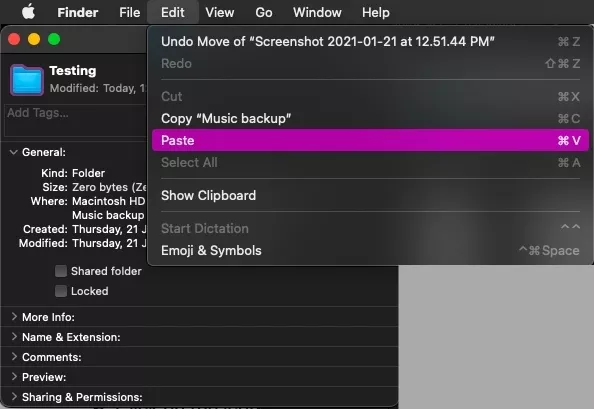
Go to Edit > Paste or Press the keyboard shortcut Command-V to paste the image.
If you have downloaded an .ics icon, you can simply drag and drop it on the folder or file icon in the Info panel.
Unfortunately, macOS doesn’t allow users to change icons of multiple files and folders simultaneously. But if you’re planning to do that, the easiest way would be to open multiple Info panels at once and start pasting the new icon image on top of the icons of every file or folder.
If you wish to change the folder icon color in Mac: Simply download the macOS default folder icon png image > Open it in Preview > Click to tools and then click on Adjust color > Save the image and follow the same How to change folder icon in Mac steps.
By downloading the macOS default folder icon png image, you can also revert the changes made to the folder icons in macOS.
The image can be of anything; it can be a photo of you as well. As for the image format, we would recommend downloading a PNG image. A JPEG image would also work, but having a PNG image means you can have a transparent background around the object in the image. However, the best one to use here would be an ICNS (Apple Icon Image format) image which is macOS’s own icon format.
That’s how one can change the icon of a file or folder in Mac. You can also use the same method to change the app icon on your Mac. Simply navigate to the Applications folder in the Finder and follow the above-mentioned steps.