But if we talk about the second batch, which includes the majority of Xiaomi devices, not much has changed. While the MIUI 12 Pilot program has recruited a few Mi users, it is yet to begin beta testing for the second batch of devices. This pace indicates that the MIUI 12 update for the majority of Xiaomi devices is at least a few months away.
But that shouldn’t stop Mi fans from trying the features of MIUI 12. Thankfully, there is a way through which you can get, not all, but at least one of the best MIUI 12 features, and that is the new Control Center.
How to get MIUI 12 Control Center on any Android device?
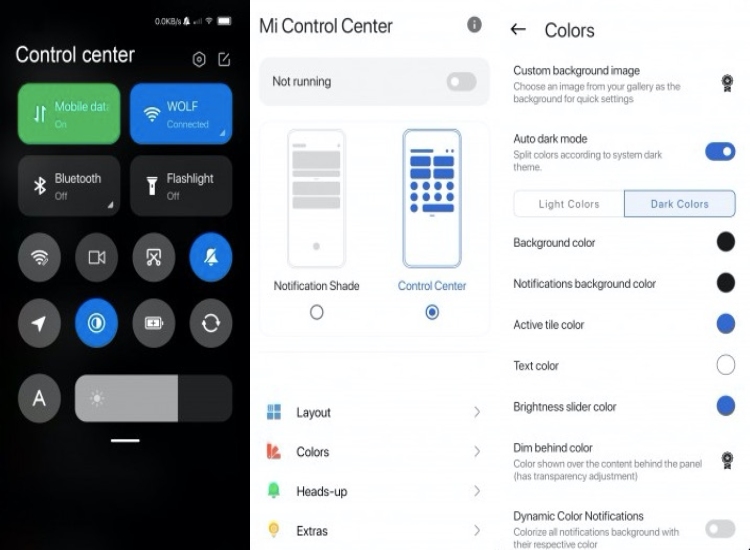
Xiaomi’s MIUI 12 Control Center is inspired by the iOS control center and, therefore, features a similar interface. Swiping down from the top right corner of the screen brings up the Control center, meanwhile a swipe down from the top left brings up the notification shade.
If you have a Xiaomi device or any other Android, you can get Xiaomi’s new Control center by merely downloading the Mi Control Center app from APK Mirror. It is a third-party app from a developer named Alex that brings MIUI 12’s new Control Center to any Android device.
Mi Control Center APK features
The best part about the Mi Control Center app is that it features way more customization options than you will ever see on the official one. You can have different colors for the background, text, icons, brightness slider. Moreover, the app enables you to change the color of the pop-up badge as well.
The Control Center APK also comes with a Light mode and Dark mode option. You also have the option to toggle the “Auto Dark Theme” settings which will change the Control Center’s based on the device theme.
Few features are only available to premium users like setting a custom background image or dimming the color shown over the content tiles.
Even if you don’t use the customization options, you can still use it as a replacement to the official MIUI 12 Control Center. If you have a Xiaomi device, it’s a great alternative until MIUI 12 officially arrives on your smartphone.
Here’s the real-world mileage of Tata Altroz XZ petrol in city conditions with bumper-to-bumper traffic. Earlier, we had informed our readers of the fuel efficiency of Tata Altroz on the highway. This time we shall see how Tata’s hatchback, which rivals Maruti Swift and Baleno, performs in the city.
The city mileage test was also done by the same YouTuber Tarun Shandilya who did the highway mileage test.
The guy owns the Tata Altroz petrol XZ variant and he managed to churn out a mileage of around 30km/l in highway test with his car.
Anyway, let’s see if Tata Altroz is as fuel-efficient in the city as it is on the highway.
Tata Altroz Petrol City Mileage
Image: YouTube (Tarun Shandilya)
The YouTuber used the tank to tank the method for the test. In this method, he filled the fuel-tank up to its maximum capacity and refilled it at the end of the trip, and calculated the total fuel consumed.
The YouTuber used this method to recheck the mileage provided on the instrument cluster. Which isn’t accurate most of the time.
Additionally, the air-conditioning of the car was kept on at 25 degrees celsius and the City mode was selected for the trip. Moreover, the driving style and conditions were pretty much normal.
During the whole journey, the owner traveled only in the city of Hisar, Haryana. As we know the case of Indian cities, most of the time the car crawls in second or third gear only.
Additionally, the YouTuber said that he did not turn off the engine even on the red lights.
Result:
Image: YouTube (Tarun Shandilya)
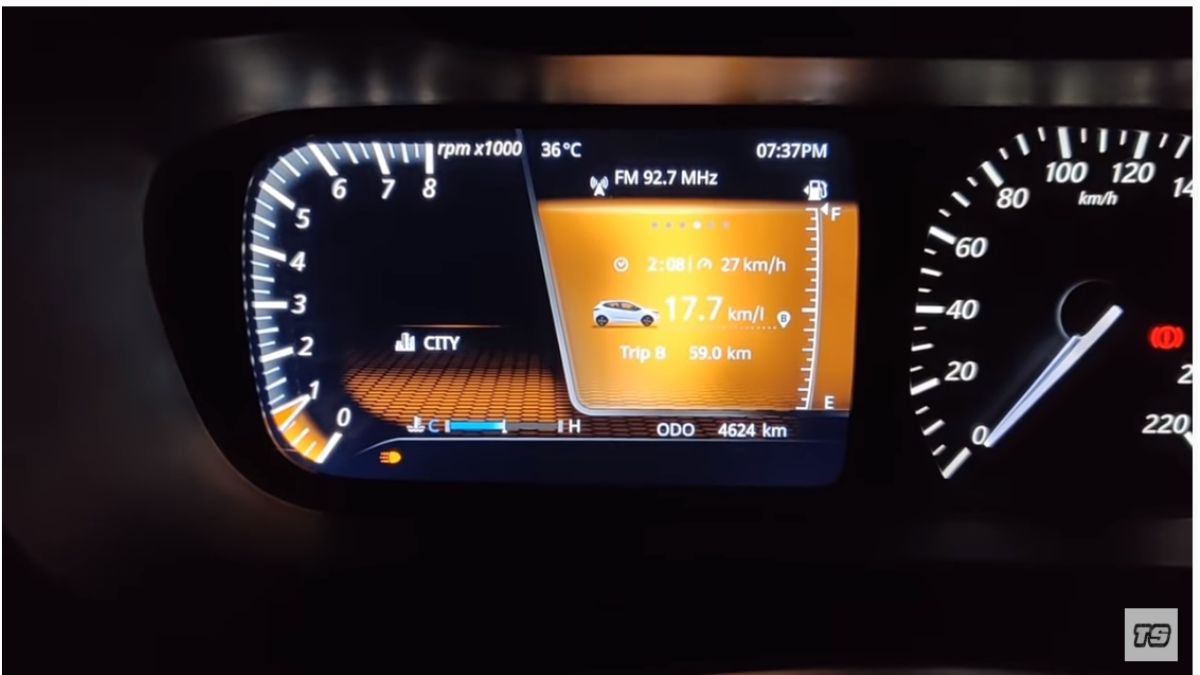
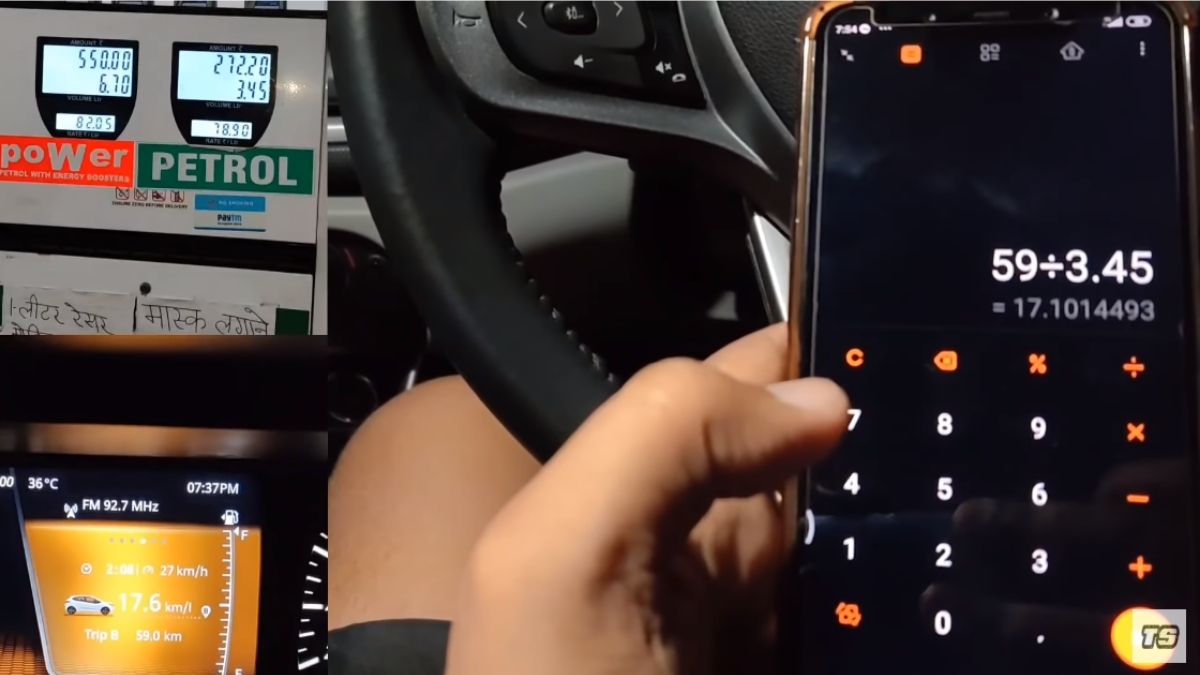
In total, he drove his car in the city for almost two hours and covered a total distance of 59 km. Moreover, the average speed for this whole trip was around 27 km/h.
According to the instrument cluster, Tata Altroz provided a fuel-efficiency of 17.6 km/l. However, the car consumed 3.45 liters of petrol for covering 59 km. So, if we calculate it manually, the mileage turns out to be 17.10 km/l. Furthermore, this mileage can be increased further if the owner had used Eco mode to drive around town.
Real-world mileage is a bit different, which is totally acceptable. So one cannot completely rely on the readings provided by the instrument cluster.
Though 17.6 km/l might seem a little low, it’s quite efficient considering the cramped city conditions.
Anyway, if we talk about Maruti Swift, then as per Cardekho, it has a mileage of 16.1 km/l in the city and 22.43 km on the highway.
In contrast, Tata Altroz provides better mileage both in the city as well as on the highway. For further details, here’s the link to the video of this efficiency test.
Anyway, share your thoughts on this? Which one do you prefer?
Nitrux founder Uri Herrera has released a new point version — Nitrux 1.3.0. The latest v1.3.0 includes several software updates, bug fixes, performance improvements, and new hardware support.
Nitrux is one of the unique Linux distributions not only because of its beautiful desktop but also for using a portable universal application format in addition to a package manager like APT and DPKG. Let’s see what more Nitrux 1.3.0 offers.
Nitrux 1.3.0: What’s New?
Starting with visual changes, v1.3.0 has upgraded the KDE Plasma desktop to its new version 5.19.2, KDE Framework to version 5.71.0, and KDE Applications bundle to the latest v20.04.02. Subsequently, it has given touch-ups to SDDM (Simple Display Desktop Manager) theme, Plasma splash, and lock screen.
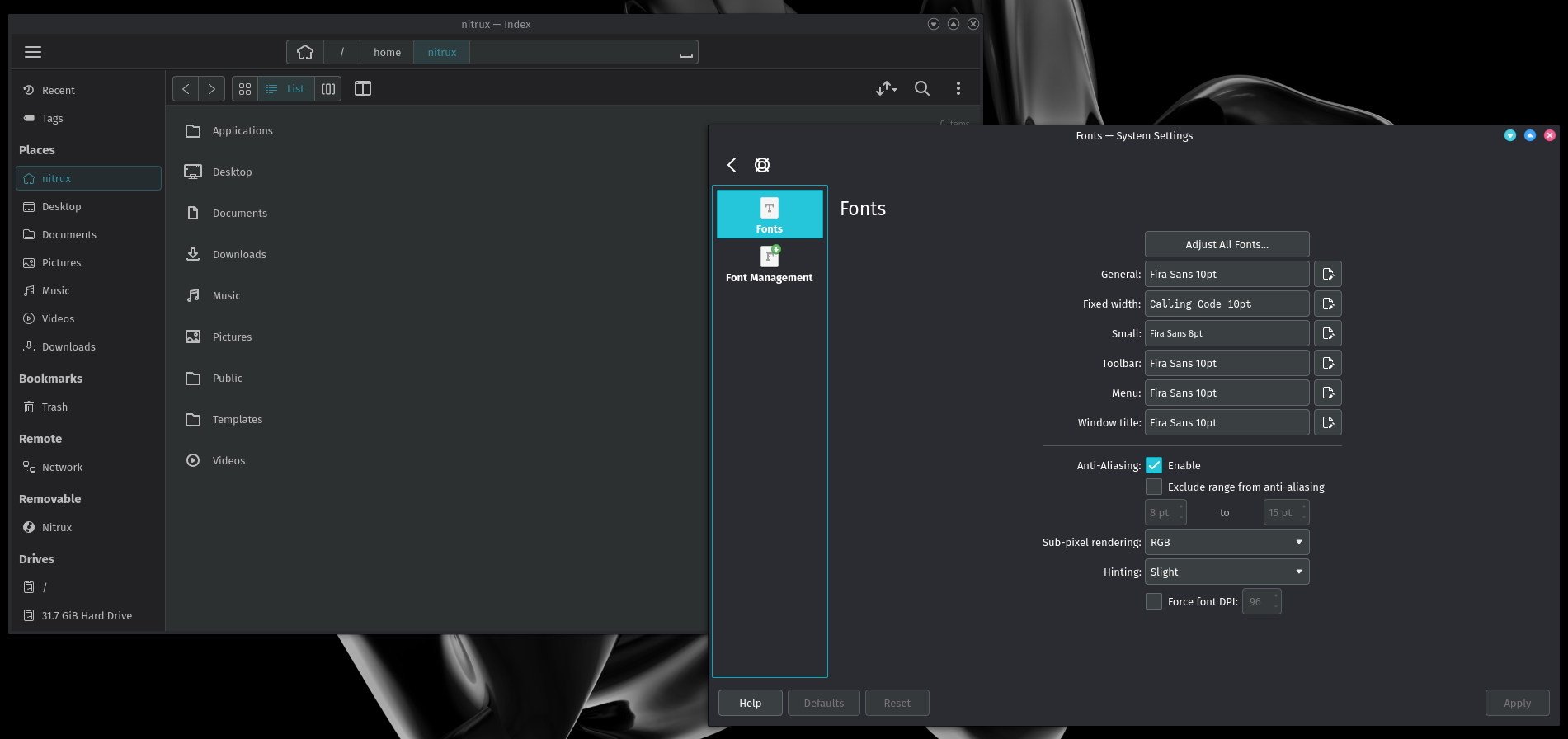
Nitrux 1.3.0 has updated the GTK theme to match up with the Kvantum theme and Plasma color scheme. It has also changed the default font from Chivo to Fira Sans to give the desktop a modern look with good readability.
Fira Sans default font in Nitrux 1.3.0
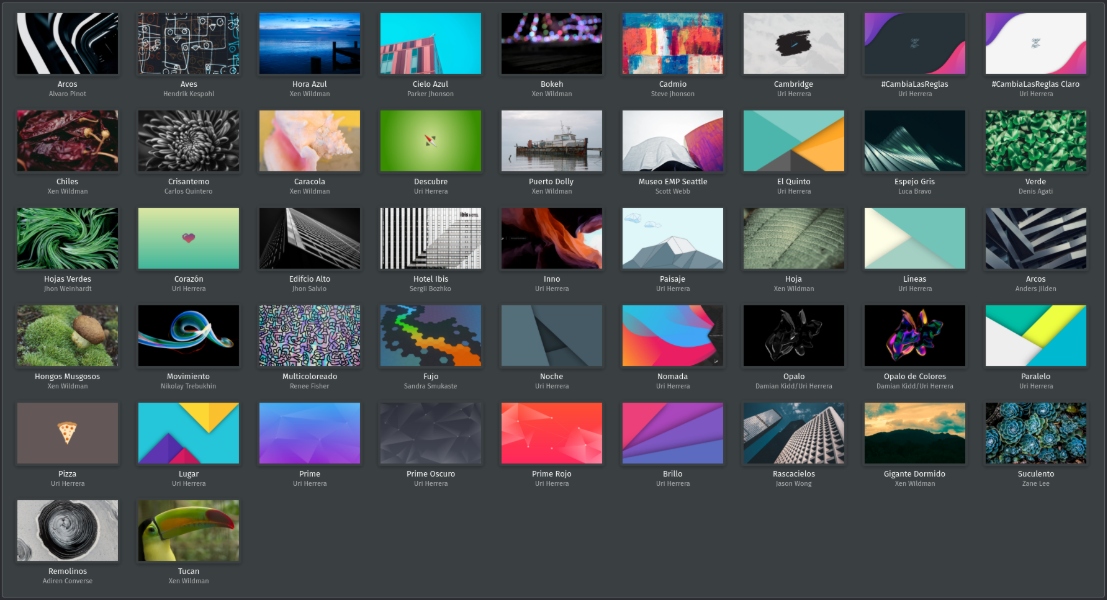
With v1.3.0, you can now use new Day/Night wallpaper plugins to simulate your background color according to daylight. Furthermore, along with default wallpaper Opal, Nitrux has added more wallpapers to the default selection.
Nitrux 1.3.0 New Wallpapers
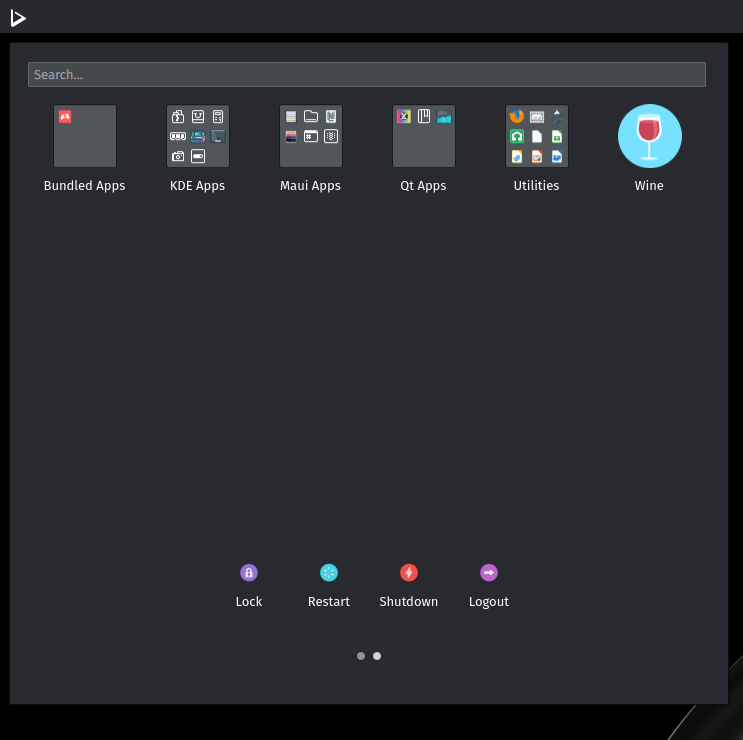
Coming to the apps, Nitrux 1.3.0 has introduced a new AppImage of Wine that lets you run Windows apps on the Linux system. Nitrux v1.3.0 also includes applications with their latest versions such as Inkscape 1.0 and Firefox 77.0.1.
New AppImage Of Wine
Moving forward, Nitrux now features Linux Kernel 5.6.0-1017 that brings new enhancements and hardware support. This includes VirtualBox Guest support for a shared folder, a new AMD TEE driver, and support for WireGuard VPN, USB4, Amazon Echo speakers.
Lastly, v1.3.0 has upgraded the NVIDIA driver and its libraries to version 440.100. Subsequently, Nitrux now has better support forproprietary NVIDIA graphics drivers.
If you want to give it a try right now, ISO images are available to download from here.
PUBG Mobile has confirmed that the0.19.0 Update would introduce a 40-player battle royale map, Livik. Other than that, the upcoming update will release with a bunch of new amazing content. That’s why players are desperately waiting for the release of 0.19.0 update.
But the wait forPUBG Mobile 0.19.0 Update is going to end soon. Recently, PUBG Mobile confirmed that the 0.19.0 update would release on July 7.
PUBG Mobile confirmed the 0.19.0 update release date on its social media handles. What’s more, the first-ever PUBG Mobile exclusive map, Livik, will also launch with the update.
On July 7th, update 0.19.0 launches along with the first-ever PUBG MOBILE exclusive Map Livik . Are you ready to face this new challenge head-on?
July 7 onwards, players can experience new features like waterfalls, healing springs, and monster trucks in PUBG Mobile’s smallest map.
Previously, PUBG Mobile fans predicted that the 0.19.0 update would release in the second weekof July. Nevertheless, it’s incredible that the update is arriving a little earlier.
As of now, there is no official statement on the size of the update. However, it’s safe to say that the update size will be no less than 2GB.
As we are on the topic, PUBG Mobile 0.19.0 update will launch a Miramar exclusive event, The Ancient Secret. This event will introduce features like sky temples, snakes, and Mummy boss in Miramar. Moreover, there will be a new TDM ‘Library’ mode in the next update.
In short, there are numerous reasons to be excited about the PUBG Mobile 0.19.0 Update.
The man, the myth, the legend, and probably Reddit’s other favorite person after Keanu Reeves, Elon Musk is a gem. Despite several controversies and a bad financial year for Tesla, Elon Musk continues to stand up like a champ. So today, on his 49th birthday, here’s a look back at the top 10 Elon Musk moments which prove why he’s the most popular CEO on the planet.
1: Elon Musk Plans to Blow Nukes on Mars
Stephen Colbert asked a question about how long it will take for humans to be able to easily live on Mars. Well, Elon’s answer dropped like a bomb. He said that humans could warm up the atmosphere of Mars (basically terraform it) with a couple of Nukes. Now I don’t have a degree in Nuclear Physics or “Terraform engineering” but this was something which only Elon Musk could have said. And I love it.
2: Historic Landing of Falcon 9 Rocket
This particular event was quoted by National Geographic as “Space X Makes History”, so you better believe that this will be in history books in the future. The epic launch of the Falcon 9 rocket was an event which was watched worldwide by millions of people. The tension and the drama during this event alone could be made into an Oscar-worthy movie. Needless to say, this was one of the best Elon Musk moments ever.
3: Elon Musk exposes Top Gear
The feud between Jeremy Clarkson and Elon Musk goes back several years. It all started when Clarkson reviewed the first generation Tesla Roadster on his popular show Top Gear and implied that the car had run out of battery during the road test. Later on, Elon came along to show that Clarkson was falsely implying a problem with the car. I’ll let you watch the video for yourself as it is full of revelations and quite interesting.
4: Elon Musk Showcases Tesla Roadster
This might not exactly be among the best Elon Musk moments, but the Tesla Roadster is one hell of a car. It can do 0-60 mph in 1.9 seconds. Achieving this kind of acceleration is so difficult that there are actual YouTube videos explaining the same thing.
And it’s not just that, the Tesla Roadster, which will launch in 2020 will have a 600miles/1000kms battery range. A lot of people are waiting for this car and for good reason. The Tesla Roadster is an economic hyper sports car; no one thought it could be possible, but Elon Musk still did it.
5: Elon Musk Talks About His Raging Mind
Elon Musk is a genius, there are no two thoughts about it. But everything comes at a cost, even being a genius. Most people remember the interview between Elon Musk and Joe Rogen for the moment when he tried out some weed. However, the most interesting part of the interview was when Elon talked about how his brain is constantly full of ideas and that he never gets any mental rest.
6: Elon Musk Had An Uninsured McLaren F1
As it turns out that besides running Tesla and SpaceX successfully, Elon Musk is also a pretty funny guy. In an interview with Pandodaily, Elon revealed the story of how is McLaren F1 is no longer driveable. It’s one of the best Elon Musk moments and I’d love for you to see it yourself.
7: Elon Musk Wants a Catgirl Waifu
In the words of the great Elon Musk: “I love Anime”. During his famous TED event, Elon explained the “need” to bio-engineer catgirls for the future. But again all of this is just pure fun and he obviously isn’t going to start genetically engineering new organisms.
8: Elon Musk Hosts Pewdiepie Meme Review
Elon Musk showcased his love of memes by hosting a meme review with the most popular YouTuber Pewdiepie. The best part is that Elon was accompanied by the Rick & Morty creator Justin Roiland. Needless to say, it was a super exciting moment for the fans who had a great laugh alongside Elon when he reviewed the dolphin meme.
9: Elon Musk Donated $480,000 For Clean Drinking Water
Elon Musk recently donated a huge sum of money to schools in Flint, Michigan to help them clean their drinking water last year. Although some would say that Elon was late on his promise of donating to the charity about it, he still went through with it nonetheless. The official Twitter handle of Flint Schools made a heartfelt tweet after the donation, thanking Elon as well.
10: Elon Hires “The Absolute Unit” Meme Guy
This one is a tip for all the fans of Elon Musk, you guys need to follow all the social media accounts of Tesla. Elon has recently hired a really funny chap by the name of Adam Koszary as Tesla’s new social media manager. Adam is the guy behind the viral “Absolute Unit” meme of a sheep. He used to work as a program manager for the Museum of English Rural Life but now he’ll be tweeting for Tesla. Take a look at his details below.
Love him or hate him, you just can’t ignore Elon Musk. He is also giving us ridiculously fun electric cars and a possibility for space exploration. My only question for Elon is, “When will you launch the Tesla in India?”. I promise that I alone will sell thousands of them, just come to India. Anyways, Happy Birthday Sensei.
Spotify is used by a lot of millennials. Its premium subscription allows users to listen to their favorite songs without any ads and download them as well. It is available at $9.99 per month.
While Spotify is one of the best music streaming platforms, other music apps keep coming forward with lucrative offers on their premium subscriptions. So what if you want to try some other app and cancel your Spotify premium subscription?
Well, you can’t cancel Spotify premium subscription via the app, but you can do it through a web browser.
How To Cancel Spotify Premium Subscription via a browser?
Open any web browser on your smartphone and go to the official Spotify website.
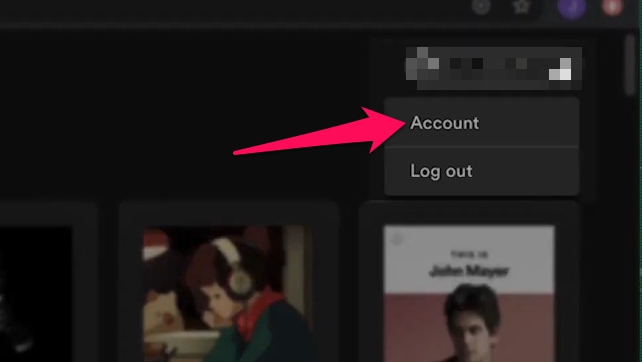
Login to your account by tapping the ‘Account’ button.
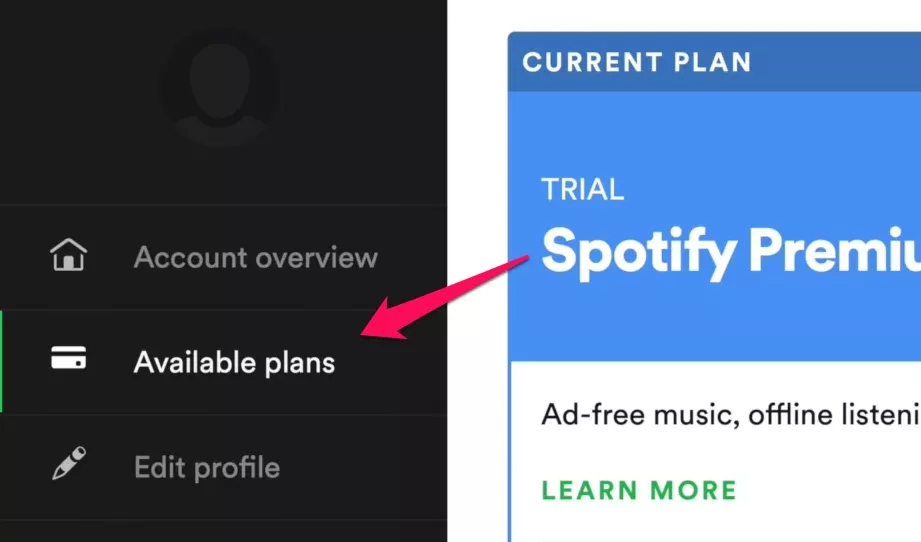
Now scroll down to the ‘Your Plan’ section and then tap the ‘Available Plans’ button.
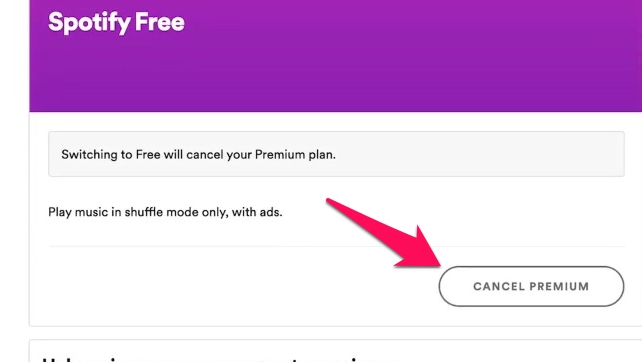
Scroll down to Spotify Free option and then tap the ‘CANCEL PREMIUM’ button.
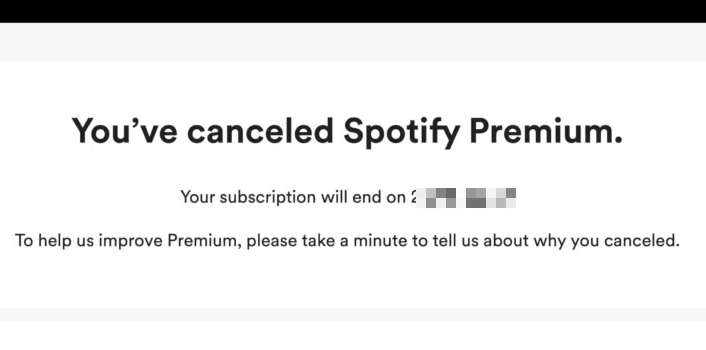
Once you do that, Spotify will cancel your premium subscription, and you will also get a confirmation message for that.
By following the steps mentioned above, you can cancel your Spotify premium subscription. If you opted for a free trial offer, make sure you cancel your subscription before your free trial ends.
FAQs
Will Spotify charge me if I cancel?
If you cancel Spotify’s premium subscription before the billing date, then you won’t be charged, and your account will be converted into a free account.
You must keep a tap on the billing date as Spotify will automatically deduct the money from your bank account as soon as the billing date arrives.
How long does Spotify Premium last without paying?
As of now, Spotify Premium’s free trial period lasts for three months. The free trial service is available for both — regular plan and family pack plan. After the Spotify Premium free trial ends, users are supposed to pay for their Spotify subscription.
Will I lose my playlist if I cancel Spotify Premium?
No, you will not lose your playlists or any downloaded songs. However, you will not be able to play any of the songs in your playlist offline once your Spotify Premium subscription is canceled because offline playlists and downloads are premium features. You can access those playlists only when you are online.
Do Spotify premium downloads expire?
The music you once downloaded on Spotify premium can expire if you don’t go online on the platform once every 30 days. However, it only happens in the rarest cases.
How do I remove my card or change the payment method on the Spotify app?
Just go to your account page and tap on ‘Manage Subscriptions and Payment’ and head to the Change payment method or card details option.
Now, you can add a new card or an original payment method according to your preference.
Amidst the ongoing pandemic, NASA has done its part for the humankind by developing a necklace that can stop the spread of coronavirus. NASA’s DIY necklace works as an alarm that stops the user from touching their face as it increases the chances of spread.
NASA’s DIY necklace has been named PULSE. The 3D printed necklace features a proximity sensor that starts vibrating as soon as the hand approaches near it. The vibrations get stronger with the closeness of the hands with the face.
As mentioned by Slashgear, NASA’s DIY necklace will help in developing muscle memory to help users avoid touching their face. This will be very helpful in the long run as Coronavirus is not going to fade away soon.
The best part is that NASA has open-sourced all the instructions to develop the necklace. It has also mentioned the specific parts to create the pendant. Users can themselves assemble the pendant if they have basic DIY skills.
It is expected that we could see more companies producing this DIY device. It could turn out to be a good business opportunity.
However, the majority of health professionals have said that the pendant cannot completely stop the transmissions. Experts have urged people to wear masks whenever they are going to crowded places. People are also asked to sanitize their hands frequently to stop the spread of the virus.

 . Are you ready to face this new challenge head-on?