Wednesday, December 2, 2020

BlackArch Linux 2020.12.01 Released With 100+ New Hacking Tools

As we’re heading toward the end of 2020, BlackArch team has released its second and last new snapshot of this year as BlackArch 2020.12.01.

The latest version includes Linux kernel 5.9.11, updated system packages, config files, and tools. It has also added more than 100 new hacking tools, which lead to the total count of tools in BlackArch to 2608.

This Arch Linux-based operating system for penetration testers and security researchers has also renamed “Live ISO” to “Full ISO.” Along with renaming, the team is now preparing a new “Slim ISO” featuring lightweight Xfce desktop environment.

Additionally, BlackArch 2020.12.01 has updated all vim plugins and available window managers that includes Fluxbox, Openbox, Awesome and spectrwm.

Here are the other changes that a new BlackArch snapshot includes:

  • Updated blackarch-installer to v1.2.16
  • Removed unnecessary files from the ISO env
  • Bug fixes for several packages like missing dependencies
  • Improved vim config options

At last, if you want to try the latest BlackArch 2020.12.01, grab either a full ISO containing a complete and functional BlackArch Linux system or netinstall ISO for a lightweight image for bootstrapping machines and install it following the official guide.

The official OVA image of BlackArch is also available for Virtualbox, VMware and QEMU.

Since BlackArch Linux is compatible with existing or normal Arch installations, you can also install BlackArch on top of Arch Linux by running the following commands:

$ curl -O https://blackarch.org/strap.sh 
$ echo d062038042c5f141755ea39dbd615e6ff9e23121 strap.sh | sha1sum -c 
$ chmod +x strap.sh 
$ sudo ./strap.sh 
$ sudo pacman -Syu 

Now, to install all tools from the BlackArch repository, run the commands:

$ sudo pacman -S blackarch 

The post BlackArch Linux 2020.12.01 Released With 100+ New Hacking Tools appeared first on Fossbytes.


BlackArch Linux 2020.12.01 Released With 100+ New Hacking Tools
read more

Tuesday, December 1, 2020

Linux-Based PinePhone CE With KDE Plasma Mobile Available For Pre-Order

After two weeks of the official announcement, pre-orders for the new PinePhone Community Edition (CE) with KDE Plasma Mobile has finally started.

As you may know, this latest PinePhone KDE Community Edition is available in two hardware variant: the Regular edition (cost $149.99) with 2GB of RAM and 16GB of eMMC, and the Convergence Package (cost $199.99) with 3GB of RAM and 32GB of eMMC bundled with a USB-C dock to connect it to external peripherals like mouse, keyboard, and monitor.

Before you place an order, let’s discuss the new PinePhone KDE Community Edition in brief.

KDE Plasma Mobile on the PinePhone

This KDE edition of the PinePhone is the fourth community edition smartphone by PINE64 after Ubports, postmarketOS, and Manjaro CE. However, it possess almost the same hardware specification as the last two PinePhone CE had, which is as follows:

  • Allwinner A64 Quad Core SoC with Mali 400 MP2 GPU
  • 2GB/3GB of LPDDR3 RAM
  • 16GB/32GB eMMC
  • 5.95 inch LCD 720p with 18:9 aspect ratio
  • HD Digital Video Out
  • USB Type C (Power, Data and Video Out)
  • WiFi: 802.11 b/g/n, single-band, hotspot capable
  • Bluetooth: 4.0, A2DP
  • GNSS: GPS, GPS-A, GLONASS
  • 2MP Selfie and 5MP Main Camera with LED Flash
  • Sensors: accelerator, gyro, proximity, compass, barometer
  • Three External Switches: up, down and power
  • HW switches: LTE/GNSS, WiFi, Microphone, Speaker, Cameras
  • Samsung J7 form-factor 3000mAh battery

While on the software side, it does differ from others as PinePhone KDE CE features a customized Plasma Mobile user interface.

Surprisingly, this Plasma Mobile UI for PinePhone is built upon the Manjaro Linux ARM OS. And if you remember, Manjaro ARM also powers the previous PinePhone Manjaro Community Edition.

Hence, along with KDE convergent applications like KDE Connect, Okular, you also gets mobile apps from other environments packaged in Manjaro and has hardware support for Manjaro images.

If you want to buy right now, you can place an order for this new PinePhone CE with KDE Plasma Mobile from the official store.

The post Linux-Based PinePhone CE With KDE Plasma Mobile Available For Pre-Order appeared first on Fossbytes.


Linux-Based PinePhone CE With KDE Plasma Mobile Available For Pre-Order
read more

Free Proxy List 2020 [Proxy Server List To Hide Your IP Address]

With the internet becoming a hotbed for tracking activities and an ever-growing race to collect data, it has become essential to find a means to hide your digital footprints, especially if you are a privacy fanatic. There are several methods to browse the internet anonymously, but the options are a tad limited if you’re looking for free ones. One of the safest options is using a free proxy.

Proxy servers offer a convenient way to hide your IP address and browse the internet without worrying about trackers and websites tracking you. You can easily find free proxy lists on the internet, but it has to be a good fortune if you stumble upon a list of free proxies that are really working.

Free proxy lists are used by many, including data scrapers and those looking forward to bypassing the paywall or rate limits, but free proxies come with certain caveats. You need to make sure that you’re using credible proxies since the incoming and outgoing traffic from your PC will be visible to it. To make it easy for you, we have compiled a free proxy list that you can use for your different needs.

Free Proxy List 2020 & Proxy Servers To Hide IP Address

1. Free Proxy – Best free proxy server to use for data scraping

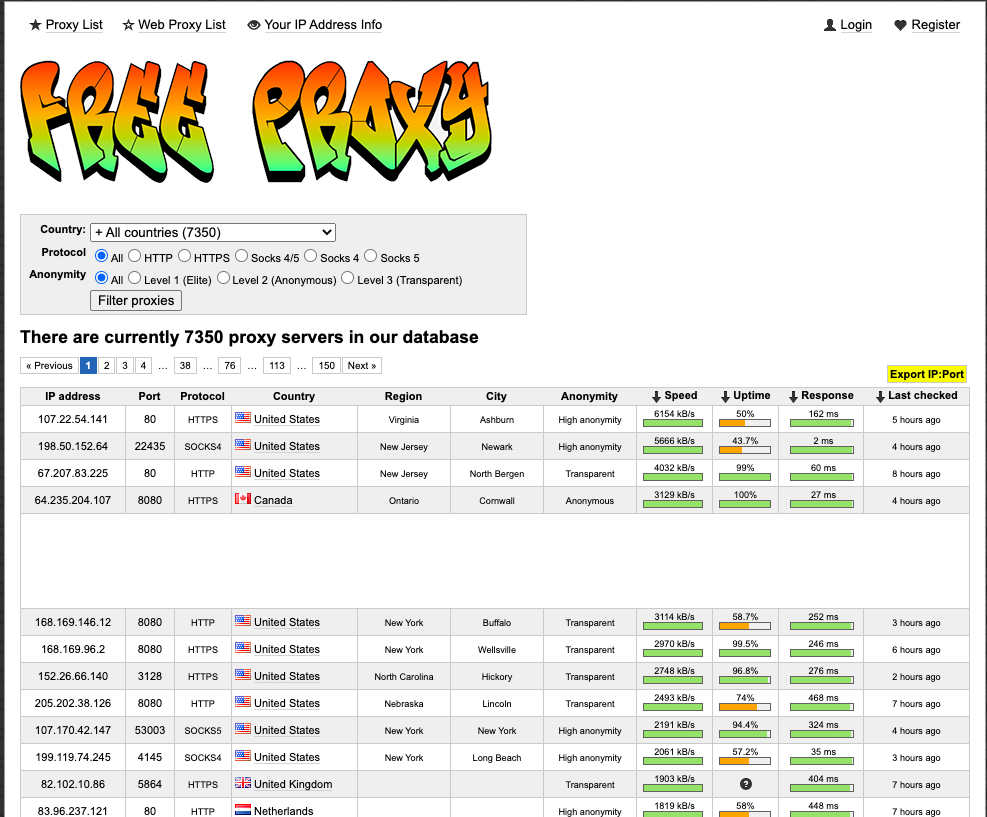
If you want to use a data scraper bot, there is no better site than ‘Free Proxy.’ As evident from its name, the website offers a host of (7350 proxy servers at the time of writing) proxy servers.

You can choose from a variety of protocols, including HTTP, HTTPS, SOCKS4, SOCKS5. The Free Proxy website offers three anonymity levels – Level 1 (Elite), Level 2 (Anonymous), and Level 3 (Transparent).

There is also an option to choose free proxies according to a particular country. The website’s neatly designed user interface offers information about anonymity level, speed, uptime, response, and the last time when the free proxy was checked or updated.

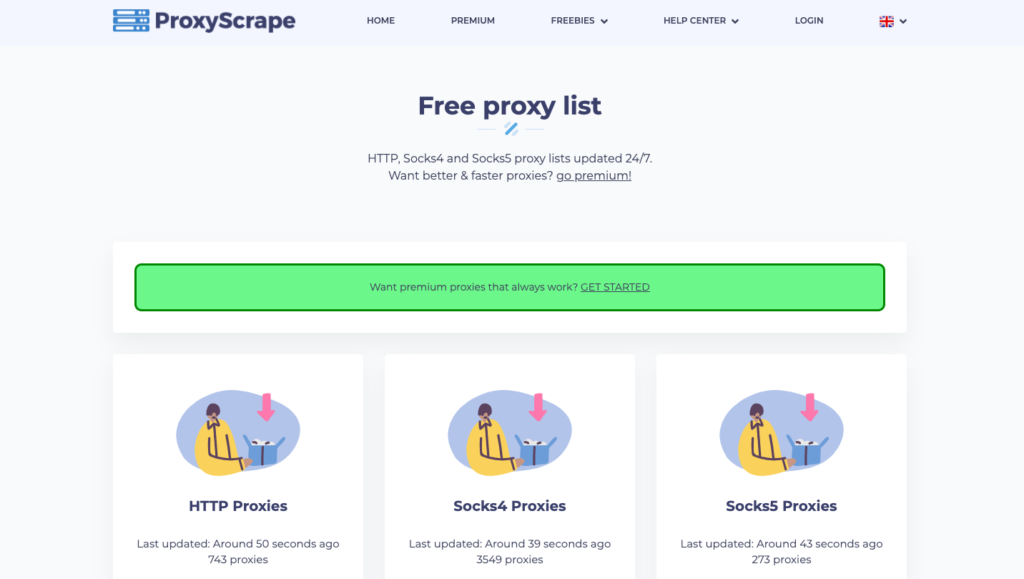
2. ProxyScrape – Popular Proxy site with ~10,000 free proxies

ProxyScrape is a popular name amongst those who frequently search for free proxy lists.

What makes this site unique is that all the proxies enlisted here are frequently checked, therefore eliminating the chances of finding a free proxy that doesn’t work. Here, you can find a proxy server list for a variety of purposes like adding an extra layer of protection to your internet traffic or scraping data from a website without harming it, and more.

ProxyScrape also offers premium proxies if you want them better and faster.

Also Read: 5 Best Free Proxy Servers To Visit Sites Anonymously In 2020

3. ProxyNova – Free proxy list updated every 60 seconds

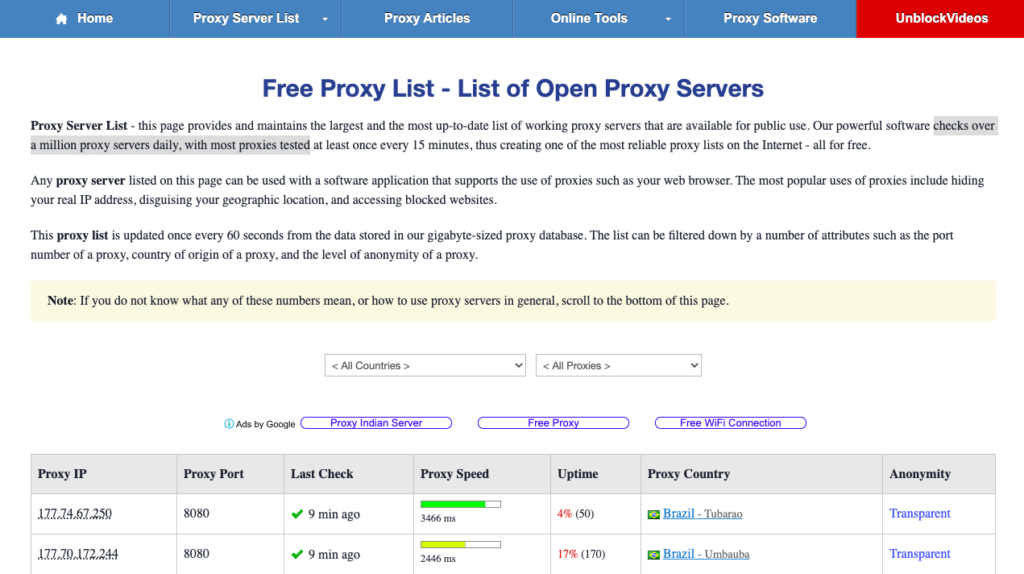
ProxyNova is another website to get a list of highly functional free proxies. The website checks over a million proxy servers daily, with most proxies, tested every 15 minutes, and the proxy list is updated once every 60 seconds.

On the ProxyNova website, you can filter proxies according to country and anonymity level. You will see options like proxy speed, proxy port, uptime, proxy country, and the level of anonymity on the homepage. Most of the top proxies on the website are not more than a minute old.

However, there is a big caveat that unlike other sites on this list,
ProxyNova needs to be updated manually and does not get refreshed automatically.

4. SSL Proxy – Get free and working SSL proxies

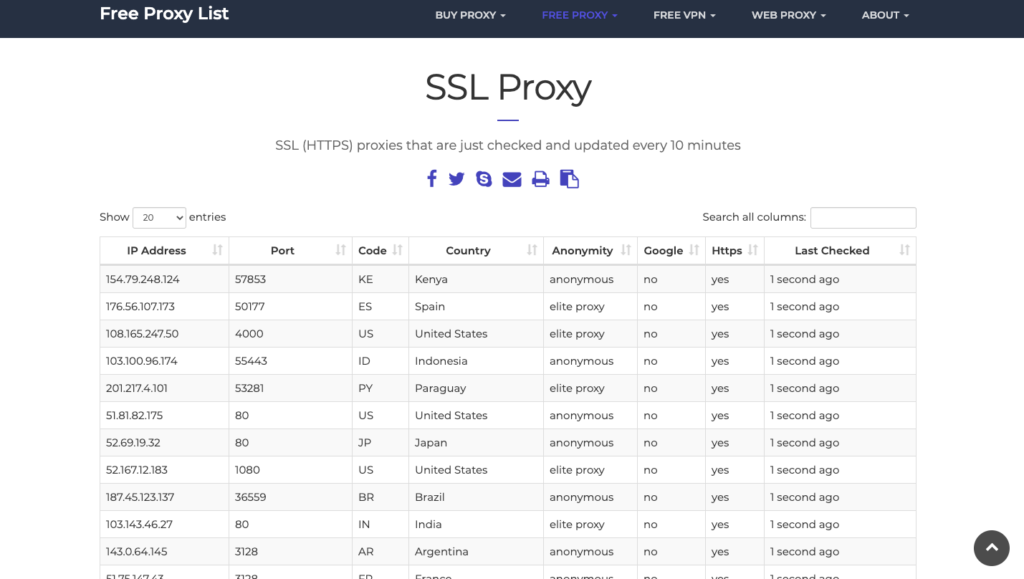
The number of free proxies available on this website is relatively less compared to other sites enlisted here. With a meager 100 free proxy sites, the website hosts proxies from various countries around the world.

To compete with other free proxy offering websites, SSL Proxy has recently launched a new product named Rotating Proxy that works like a regular HTTP(s)/Socks5 proxy, without any app. However, it has 3252 stable IPs behind and supports IP/Pass auth and country filter. There are two types of rotating proxies – fast-rotating proxies and slow rotating proxies.

The HTTP proxies on the website are updated every 10 minutes, according to the homepage’s claims.

5. Hide.me – Free proxy server to surf web anonymously

Hide.me proxy site

Hide.me needs no introduction in a list of free proxy servers, and it should not be a surprise entry here. You can find the free proxy tool under the VPN apps section as the website primarily focuses on VPNs, which is another way to hide your digital presence on the internet.

To visit a site anonymously on Hide.me, you will need to enter the website in the text box, choose the country (the options are limited though), and choose from other options available – allow cookies, encrypt URL, encrypt page, remove scripts, remove objects.

Hide.me also offers Chrome and Firefox extensions to access a website anonymously from within the browser quickly.

6. HMA – Access blocked websites with free proxy sites

HMA or Hide My Ass is a rather popular website used by several users to bypass internet censorship. HMA offers a regularly updated free proxy service that allows you to hide your original IP address and routes your internet traffic via proxy address.

To use the free proxy server service, enter the website in the textbox. Then, choose whether you would like to allow cookies, remove scripts, and encrypt the URL in the connection setup menu.

HMA’s proxy servers are majorly meant for individual users who want to unblock blocked websites in their region. For professional purposes, you can use other enlisted websites that offer a free proxy server list.

7. Open Proxy Space – Free proxy list

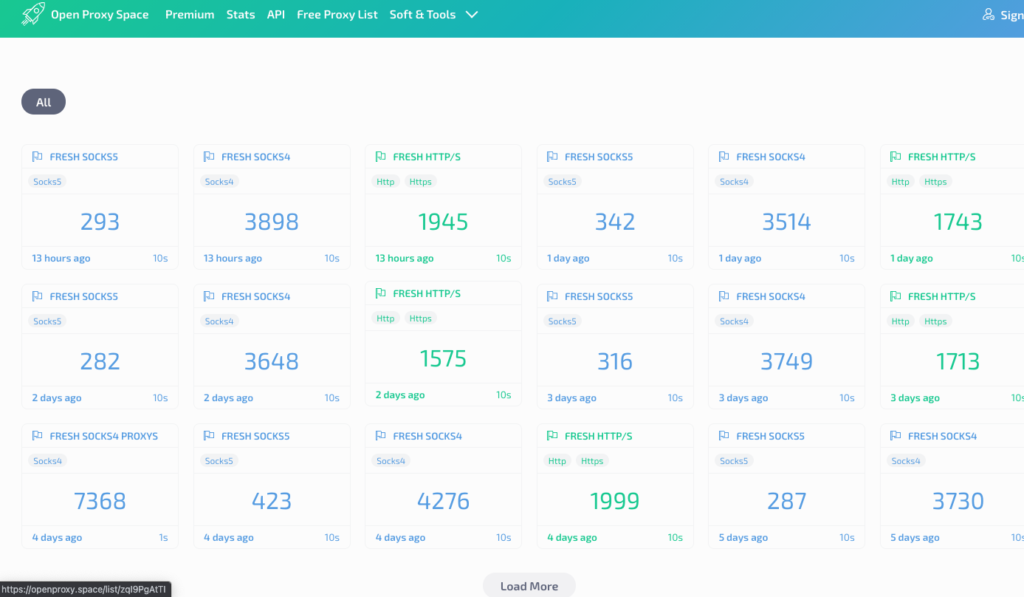
If you’re a freeloader hunting for free proxy lists, you must try the Open Proxy Space. This website offers a list of always updated proxies, and there is also an option to upload your proxy sites. You can choose from a variety of countries offered on the website.

Free proxies on Open Space Proxy are enlisted according to the last time when they were updated. It goes without saying that the older the proxies are updated, the fewer chances they’ll be working. After choosing a batch based on the time of updation, the next step is selecting the country. The IPs can also be exported in a text if you intend to use them in an API.

8. ProxyScan – 5000+ Free proxies

ProxyScan is a standard site offering a free proxy list with more than 5000 proxies in store for users. All the proxy sites offered by ProxyScan are checked every 10 minutes.

We have included this website in the list because of the parameters it offers for choosing the best proxy site. You can apply parameters like ping, country, city, type, and degree of anonymity.

The website also offers other tools like a proxy checker, proxy filter, and proxy scraper. The website updates automatically with freshly added proxy sites.

Free Proxy List FAQs

1. What is the best free proxy?

There are several websites offering free proxies. You can refer to the list above which contains websites like Free Proxy, SSL Proxy, ProxyScrape, and ProxyScan.

2. Is free proxy list safe?

Most of the free proxy lists offer proxy sites that are volatile and you can not really rely on these proxy servers for performing activities like carrying out payments and other exchange of confidential data.

3. How do I use a free proxy server?

To use a free proxy server in Google Chrome, go to Settings> Advanced> System> Open your computer’s proxy settings. Under Manual proxy settings, enter the proxy address and port.

4. Where can I find proxy?

You can find several websites on the internet offering proxy sites. Above, we have enlisted 8 websites offering free proxy list. You can visit sites like ProxyScrape, ProxyNova, ProxyScan and Open Proxy Scan to find proxy sites.

The post Free Proxy List 2020 [Proxy Server List To Hide Your IP Address] appeared first on Fossbytes.


Free Proxy List 2020 [Proxy Server List To Hide Your IP Address]
read more

How To Run Android ADB In Browser? [No Installation Required]

Android ADB aka Android Debug Bridge is a command-line utility to perform certain actions on Android devices. These actions include side-loading apps, applying updates, resetting the device, unlocking the bootloader, and more.

The utility is used by both developers and standard Android users. However, it is more popular among the former since many believe that using ADB tools is a bit “technical.”

There is some truth to it, though, since it involves the Command line and tinkering with the device on a system level. On top of that, there are ADB installation issues or problems like ADB not detecting a device which further demotivates users from using the tool.

ADB Website

However, a new website called “www.webadb.com” solves most of these problems by enabling ADB and fastboot functionality right from a web browser. “No installation, no drivers, nothing,” says XDA Developers’ member SteelToe, who is the brain behind the project.

Through the ADB website, one can sideload APKs, run shell commands, record Android screen, access files through the dedicated file manager, enable ADB wirelessly, and use open-source Scrcpy to control Android.

How do I run ADB and Fastboot in my browser?

  1. Open Google Chrome on your PC.

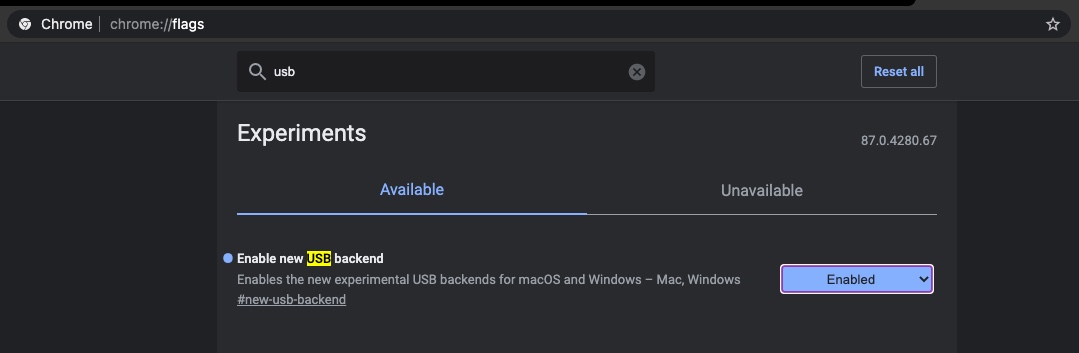
    If you are on Windows, first go to chrome://flags/ and set “Enable new USB backend” to enabled. Google Chrome flagsUSB backend

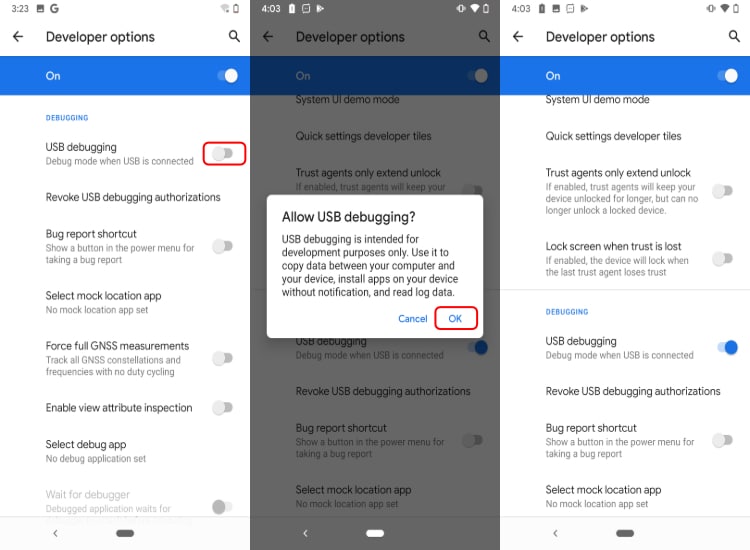
  2. Enable USB debugging on your Android device.

    You will find the USB debugging toggle in the developer options. Follow this guide to enable USB debugging.
    Enable USB debugging in Android Developer options

  3. Connect your Android device to your PC using a USB cable.

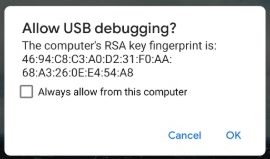
    Allow USB debugging when the prompt appears on your device. USB debugging Android Prompt

  4. Go to www.webadb.com and click on “Add devices.”

    The developer recommends using Google Chrome or Microsoft Edge in order to use Android ADB in browser.

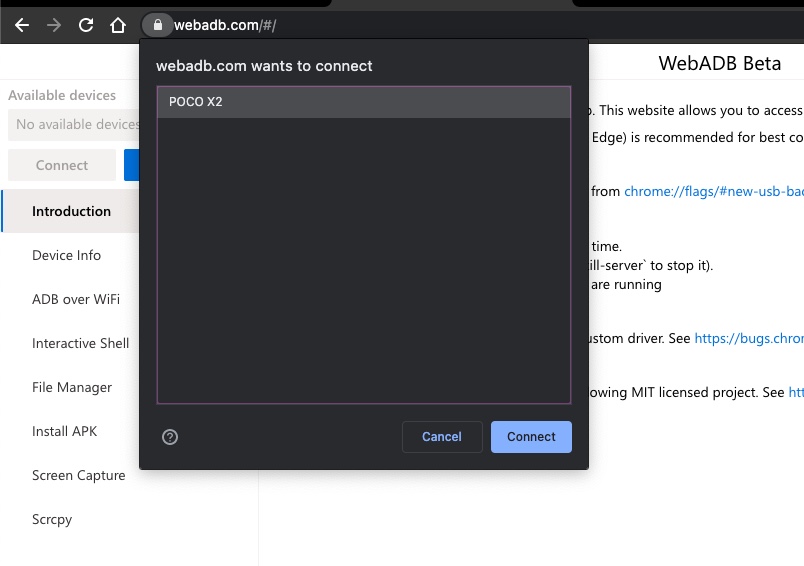
  5. Choose your Android device and click on “Connect”

    The website has listed down some issues along with their solutions that you may come across while using ADB in Google Chrome.Android ADB in browser

Once the device is connected, you can sideload apps, run shell commands, mirror Android screen to your PC and do much more. The best part is you don’t have to install ADB and fastboot drivers on your PC.

The post How To Run Android ADB In Browser? [No Installation Required] appeared first on Fossbytes.


How To Run Android ADB In Browser? [No Installation Required]
read more

Toyota Urban Cruiser Vs 2020 Maruti Vitara Brezza: Which One Is Better?

Interestingly, the 2020 Maruti Suzuki Vitara Brezza and Toyota Urban Cruiser are two same cars with different company badges. They have the same engine, dimension, suspension, transmission, features, and much more. In short, they are pretty much the same cars.

However, some key differences set them apart. From prices to features, there are a few subtle yet important differences that can act as deciding factors for customers.

Today we’ll explore how these sub compact SUVs are different from each other and which one will be better for you?

Also Read: Kia Sonet Vs Hyundai Venue: Which One To Buy?

Toyota Urban Cruiser Vs 2020 Maruti Vitara Brezza

Maruti Brezza and Toyota Urban Cruiser are among the most trending cars in India nowadays. One of the distinctive features that sets them apart from their rivals is the availability of a hybrid powertrain. None of the cars in their segment have a hybrid powertrain except for them.

Powertrain

toyota urban cruiser vs maruti brezza mileage

Both Maruti Brezza and Toyota Urban Cruiser are available in petrol and mild-hybrid petrol engines. Under the hood is the BS6 compliant 1.5-liter petrol engine that makes around 103 BHP and 138 Nm of torque.

The hybrid variant has an advanced li-ion battery along with a petrol engine. Hybrid variants are fuel-efficient and produce fewer emissions. However, in both cars, the hybrid variant is available only with an automatic transmission. Also, the petrol variant is paired only with manual transmission.

In terms of mileage, the company claims the petrol variant is capable of delivering 17.03 km/l whereas the hybrid model churns out 18.76 km/l.

Key Differences

Maruti Brezza is available in nine different variants comprising of four hybrids and five non-hybrid variants. In contrast, Toyota Urban Cruiser is available in six different variants, out of which half of them are hybrid models and half are petrol-only variants.

Exterior Appearance: Key differences

Although both these cars are identical and look almost the same, there are slight differences. The front chrome grille design of both the subcompact SUVs are different. In addition, the fog lamps of Urban Cruiser have a chrome accent surrounded by a hexagonal grille. Meanwhile, in the case of Brezza, there’s a simple plastic casing around the fog lamps.

You may also notice a variation in the front lower bumpers. Apart from this, there are different color matrix available for both the cars.

Interior Changes: Urban Cruiser Vs Maruti Brezza

While most of the interior remains the same, Toyota Urban Cruiser looks slightly more premium due to its dual-tone interior. There’s a black and brown combination interior with fabric seat covers. However, if you prefer an all-black interior, then Maruti Brezza is much better for you.

Safety Features

The top-end variants of both the cars are equipped with dual airbags, Hill Hold Control (in automatic variants only), ABS with EBD, reverse parking camera, and much more. However, Toyota provided a few additional features like electrochromic rearview mirrors and an anti-pinch driver side power window.

Prices

The price of the 2020 Maruti Vitara Brezza starts at Rs 7.34 lakhs and goes as high as Rs 11.40 lakhs (ex-showroom). On the other hand, Urban Cruiser is priced between Rs 8.40- 11.30 lakhs (ex-showroom).

Which One Should You Buy? Urban Cruiser Or Maruti Brezza?

Since both Brezza and Urban Cruiser provide equal values, it isn’t easy to choose one. However, apart from the design preferences, one can decide as per their own needs.

The starting price of Maruti Brezza is quite lower than the Urban Cruiser. Also, there are more variants in Brezza, which provides more options for consumers. Urban Cruiser may prove to be slightly rich in features. However, that would be of little or no value as these are not very significant changes.

In terms of maintenance and after-sales value, both companies hold a good reputation. We believe if budget is a factor in your case, then you can surely go for Maruti Brezza as it offers more options. However, if you prefer to have a handful of more features, you can go for Urban Cruiser.

The post Toyota Urban Cruiser Vs 2020 Maruti Vitara Brezza: Which One Is Better? appeared first on Fossbytes.


Toyota Urban Cruiser Vs 2020 Maruti Vitara Brezza: Which One Is Better?
read more

Uninstall Apps On Mac: 3 Easy Ways To Clean The Clutter

If you’ve accumulated a ton of apps and don’t need them cluttering your storage anymore, here are 3 easy ways to uninstall apps on Mac. macOS has evolved over time but there are still different ways to delete different apps. It is easy to remove apps that you downloaded directly from the Mac App Store. If you installed an app using a .dmg package from the web, there’s a different method to uninstall it.

Aside from the regular app removal, we’ll also tell you about some tools that can make it further easier for you to deep clean your Mac.

Why Would You Want To Uninstall Apps On Mac?

Why uninstall apps from Mac?

Like I said in the beginning, one of the reasons you might want to uninstall some apps from your Mac might be to free up storage. If you have an older MacBook with 128GB storage, you’ll have to be selective for what stays. Another reason you’d want to do so is that Apple also sends some pre-loaded apps with the Mac and you might just want them out of the way.

What Can You Uninstall?

Apple One Subscription bundles launched

Okay, so there’s a catch to deleting unwanted apps from your Mac. Like most bloatware, Apple also loads certain apps on the Mac that are there when you boot up. Some of the apps can be uninstalled, like Garage Band and iMovie, Pages, Numbers, and Keynotes. Then there are apps that you can’t remove; these include Apple TV, Apple Maps, Messages, Safari, and pretty much all the default Apple apps for basic functions.

Setting these aside, you can still uninstall apps on Mac and still free up some storage space. So let’s talk about the 3 easy ways to uninstall apps on Mac.

Method 1: Using Launchpad

The launchpad is a quick way to have a look at all the apps you have on your Mac. It is also the easiest way you can uninstall apps on Mac. The method works on most of Apple’s baked-in apps that you can remove.

  1. Get to the Launchpad

    You can access it using gestures on the trackpad by pinching in with your thumb and three fingers, or you can tap Command + Space and summon spotlight search and type launchpad.Uninstall apps on Mac using launchpad- 1

  2. Enter Jiggle Mode and Uninstall

    Press and hold the “Option (⌥)” key and you’ll enter jiggle mode. You’ll see a cross on the top left of the app icons that you can uninstall using this method. Tap on the cross while holding down the Option (⌥) key and tap delete.Uninstall apps on Mac using launchpad-3

Method 2: Uninstall Apps On Mac Using Finder

Another efficient way to get rid of apps that won't go away with the launchpad method is to use them in the Finder and delete them. Still, you can't use this method to delete Apple's baked-in apps, but other apps that were downloaded from the web can be deleted this way. Here's how you can uninstall apps on a Mac using Finder.

  1. Find the Applications

    Open a Finder Window and select Applications from the sidebar. If you can't find an app in the Applications folder, summon Spotlight search (Command + Space), type the name of the app > Press and Hold Command (⌘), and double tap on the app in search results. This will open it in Finder.

  2. Delete Applications

    Right-click (or two-finger tap) on the app you want to delete and select Move to Bin. Enter your password if prompted.

  3. Empty Bin

    To complete the process, you'll have to empty the bin. To do so, go to Bin > Tap on “empty bin”> Tap Empty.

Method 3: Using A Mac Cleaner

cleanmymac x mac

If you can’t figure out how to uninstall apps on Mac or you don’t have the time to find and remove every space-consuming app, this is the solution for you. If you get a good Mac Cleaner, of which there are plenty, you can free up more space on your Mac. A good cleaner won’t just get rid of unnecessary apps, but also additional files that may be slowing your Mac.

One of the good Mac cleaners is the CleanMyMac X. It cleans up junk and also scans for potential threats and performs a speed test on your Mac. It also has a dedicated app uninstaller where you can select multiple apps and make them vanish with one click. If you want to know more about CleanMyMac X, you should check out the article below.

Also Read: CleanMyMac X: The All-Rounder Cleaner App For MacOS

The post Uninstall Apps On Mac: 3 Easy Ways To Clean The Clutter appeared first on Fossbytes.


Uninstall Apps On Mac: 3 Easy Ways To Clean The Clutter
read more

OpenZFS 2.0.0 Released Based On Unified Code For Linux And FreeBSD

OpenZFS project has officially announced the release of a new version 2.0.0 for its open source ZFS file system with unified Linux and FreeBSD codebase and other new features.

For those who don’t know, OpenZFS is an open source storage platform that combines the traditional file system with a volume manager.

It offers several advanced features such as hardware-accelerated native encryption, efficient storage with snapshots and copy-on-write clones, local or remote replication, protection against data corruption, and storage capacities of up to 256 trillion yobibytes.

What’s New In OpenZFS 2.0.0?

With v2.0.0, OpenZFS now supports FreeBSD operating system along with Linux. It shares the same repository to make all OpenZFS features available on both Linux and FreeBSD platforms.

OpenZFS 2.0.0 has also added major new features such as support for a modern and high-performance ZStandard (ZSTD) compression algorithm, persistent L2ARC (Level 2 Adjustable Replacement Cache) across reboots, and sequential resilver feature to rebuild a failed mirror vdev device in LBA order.

Additionally, it has included a Redacted Send and Receive feature for ZFS, which further brings other related features such as enhancements to zdb and zstreamdump, an improvement to the ASSERT and VERIFY macros, the ability to do send size estimation from bookmarks, and a more accurate send size estimation process.

Using Redacted stream, you can send subsets of your data to a target system. It helps you to save space by avoiding the replication of insignificant data within a given dataset and selectively excluding sensitive information.

Furthermore, v2.0 has also added and improved the following ZFS/ZPOOL commands:

  • zpool replace|attach -s — to perform a sequential resilver
  • zfs wait, zpool wait — to wait for long running background operations to complete
  • zfs redact, zfs send –redact — to generate a redacted send stream
  • zfs send –saved — to send a partially received dataset
  • zfs rename -u — to rename a filesystem without remounting
  • zfs umount -u — to unload keys for an encrypted filesystem when it’s unmounted

Among other notable changes, OpenZFS 2.0.0 includes:

  • Enabled the systemd zfs-mount-generator by default on Linux
  • Improved bootloader support
  • Optionally colorized zpool status output
  • SIMD optimizations
  • Optimized AES-GCM encryption performance
  • More efficient ARC and memory management
  • Faster zfs send and zfs receive performance for small record sizes

If you want to try the new release, check out the Getting Started page that will guide you to install OpenZFS on your FreeBSD or Linux-based operating system.

The post OpenZFS 2.0.0 Released Based On Unified Code For Linux And FreeBSD appeared first on Fossbytes.


OpenZFS 2.0.0 Released Based On Unified Code For Linux And FreeBSD
read more

Playing Grand Theft Auto Inside A Neural Network’s Hallucination? It’s Possible!

Ever imagined what a Neural Network's hallucination would look like? The post Playing Grand Theft Auto Inside A Neural Network’s Halluc...