Xiaomi unveiled MIUI 12, the new big update to its Android skin in China back in April. The update was later announced globally in May. Since the launch, Xiaomi has been continuously issuing the latest version of MIUI to its devices.
However, it is important to understand that your Xiaomi device getting the MIUI 12 update will depend upon the roll-out schedule for your country. For instance, the MIUI 12 release schedule for global devices is different from their Chinese counterparts, and similarly, Xiaomi devices in India have their own release schedule.
It is also important to look out for whether the MIUI 12 update is a stable one or just another beta update (More info on this at the end of this article). All in all, MIUI 12 updates are one big mess, which is why in this MIUI 12 Stable Update Tracker will help you check whether your device has received the MIUI 12 Stable update or not.
Note: We will keep updating this article as MIUI 12 updates arrive for different Xiaomi devices. So don’t forget to bookmark this article!
List of Xiaomi devices that have received the MIUI 12 update
Here are the download links to MIUI 12 Global Stable updates for Xiaomi devices —
1. Mi 10
| Build | Recovery ROM | Fastboot ROM | |
| Global | V12.0.1.0.QJBMIXM | Link | Link |
| India | V12.0.2.0.QJBINXM | Link | Link |
| Europe | V12.0.1.0.QJBEUXM | Link | Link |
| Indonesia | V12.0.1.0.QJBIDXM | Link | Link |
| Russia | V12.0.1.0.QJBRUXM | Link | Link |
2. Mi 10 Lite
3. Mi 10 Lite 5G
4. Mi 10 Pro
5. Mi 9
| Build | Recovery ROM | Fastboot ROM | |
| Global | V12.0.2.0.QFAMIXM | Link | Link |
| Europe | V12.0.2.0.QFAEUXM | Link | Link |
| Russia | V12.0.1.0.QFARUXM | Link | Link |
6. Mi 9 Lite/ Mi CC9
| Build | Recovery ROM | Fastboot ROM | |
| Global | V12.0.3.0.QFCMIXM | Link | Link |
| Europe | V12.0.3.0.QFCEUXM | Link | — |
| Russia | V12.0.2.0.QFCRUXM | Link | — |
7. Mi 9 SE
| Build | Recovery ROM | Fastboot ROM | |
| Global | V12.0.1.0.QFBMIXM | Link | Link |
| Europe | V12.0.1.0.QFBEUXM | Link | Link |
| Russia | V12.0.1.0.QFBRUXM | Link | Link |
8. Mi 9T/ Redmi K20
| Build | Recovery ROM | Fastboot ROM | |
| Global | V12.0.3.0.QFJMIXM | Link | Link |
| India | V12.0.3.0.QFJINXM | Link | Link |
| Europe | V12.0.2.0.QFJEUXM | Link | Link |
| Russia | V12.0.1.0.QFJRUXM | Link | Link |
9. Mi 9T Pro/ Redmi K20 Pro
| Build | Recovery ROM | Fastboot ROM | |
| Global | V12.0.2.0.QFKMIXM | Link | Link |
| India | V12.0.2.0.QFKINXM | Link | Link |
| Europe | V12.0.2.0.QFJEUXM | Link | Link |
| Russia | V12.0.1.0.QFJRUXM | Link | Link |
10. Redmi Note 7
| Build | Recovery ROM | Fastboot ROM | |
| India | V12.0.0.2.QFGINXM | Link | — |
11. Redmi Note 7 Pro
| Build | Recovery ROM | Fastboot ROM | |
| India | V12.0.0.2.QFHINXM | Link | — |
12. Redmi Note 8 Pro
| Build | Recovery ROM | Fastboot ROM | |
| Global | V12.0.3.0.QGGMIXM | Link | — |
| India | V12.0.1.0.QGGINXM | Link | Link |
| Europe | V12.0.1.0.QGGEUXM | Link | Link |
| Russia | V12.0.3.0.QGGRUXM | Link | — |
| Indonesia | V12.0.1.0.QGGIDXM | Link | Link |
13. POCO F1
| Build | Recovery ROM | Fastboot ROM | |
| Global | V12.0.1.0.QEJMIXM | Link | — |
14. POCO F2 Pro
| Build | Recovery ROM | Fastboot ROM | |
| Global | V12.0.3.0.QJKMIXM | Link | Link |
| Europe | V12.0.2.0.QJKEUXM | Link | Link |
| Russia | V12.0.3.0.QJKRUXM | Link | Link |
| Indonesia | V12.0.2.0.QJKIDXM | Link | Link |
16. POCO X2
18. Mi Note 10
| Build | Recovery ROM | Fastboot ROM | |
| Global | V12.0.2.0.QFDMIXM | Link | Link |
| Europe | V12.0.1.0.QFDEUXM | Link | Link |
46. Mi Note 10 Lite
21. Mi MIX 3 5G
21. Mi MIX 3
22. Mi MIX 2S
| Build | Recovery ROM | Fastboot ROM | |
| Global | V12.0.1.0.QDGMIXM | Link | Link |
| Russia | V12.0.1.0.QDGRUXM | Link | Link |
26. Redmi Note 9
| Build | Recovery ROM | Fastboot ROM | |
| Global | V12.0.3.0.QJOMIXM | Link | Link |
| India | V12.0.2.0.QJOINXM | Link | Link |
| Europe | V12.0.2.0.QJOEUXM | Link | Link |
| Russia | V12.0.1.0.QJORUXM | Link | Link |
| Indonesia | V12.0.1.0.QJOIDXM | Link | Link |
| Turkey | V12.0.1.0.QJOTRXM | Link | Link |
31. Redmi 6 Pro
| Build | Recovery ROM | Fastboot ROM | |
| India | V12.0.2.0.PDMMIXM | Link | — |
43. Redmi 9A
| Build | Recovery ROM | Fastboot ROM | |
| Global | V12.0.5.0.QCDMIXM | Link | Link |
| India | V12.0.3.0.QCDINXM | Link | — |
| Europe | V12.0.6.0.QCDEUXM | Link | Link |
| Russia | V12.0.3.0.QCDRUXM | Link | Link |
| Indonesia | V12.0.2.0.QCDIDXM | Link | Link |
44. Redmi 9
45. Redmi Note 9C
How to install MIUI 12 Global Stable Update?
1. Using the Recovery ROM method
You can use this method if you haven’t received the OTA update.
- Download the MIUI 12 OTA update or MIUI 12 Recovery ROM from the links below.
- Transfer the file to the “Download_rom” folder on your Xiaomi device.
- Go to Settings → About Phone → System updates.
- Tap on the MIUI logo 7-8 times to access recovery options.
- Tap on the triple-dot menu → Choose Update Package → Select the MIUI 12 update file.
- After verifying the file, the device will start installing the update.
2. Using the Fastboot ROM method
Prerequisites:
MiFlash Tool (Download)
Unlocked Bootloader of the Xiaomi device (How-to)
USB Debugging turned on in Developer Settings (How-to)
- Press the Power button and Volume down simultaneously to enter Fastboot mode on your Xiaomi device.
- Connect your Xiaomi device with a Windows PC via a micro USB cable.
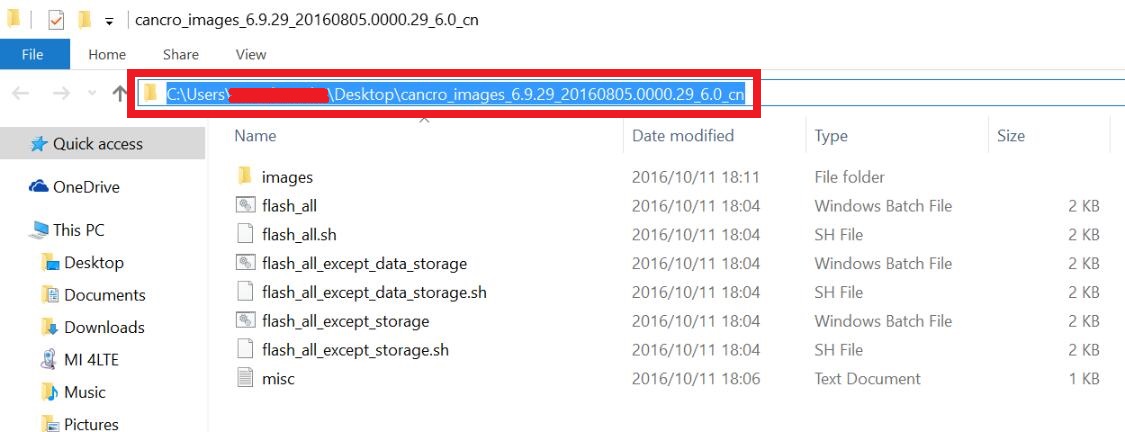
- Download the supported Fastboot ROM and extract the files. Copy the folder location. (Make sure there are no spaces in the address. If the extracted folder has spaces in-between, replace them with an underscore “_”)
- Run the MiFlash Tool as an administrator.
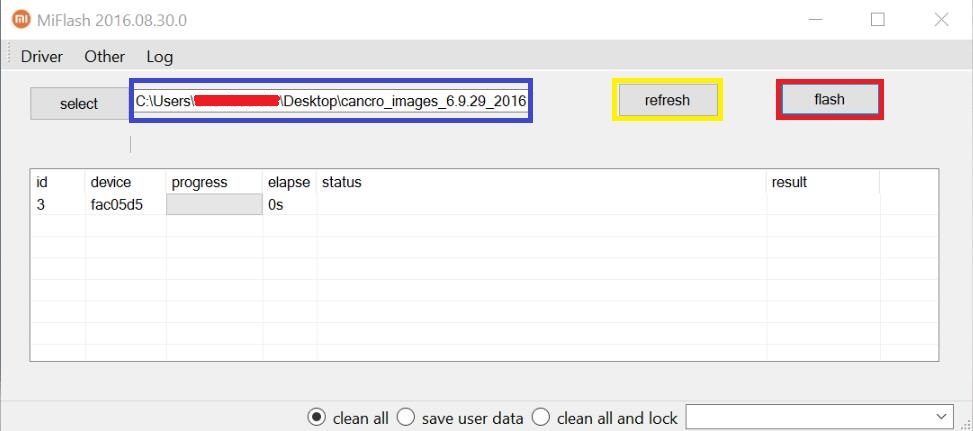
- Click on the “Refresh” button. Your Xiaomi device will appear on the screen.
- Paste the extract location in the MiFlash tool’s address bar.
- Below, choose whether you want a clean installation or want the data to remain intact.
- Click on the “Run” button to begin the flashing process.
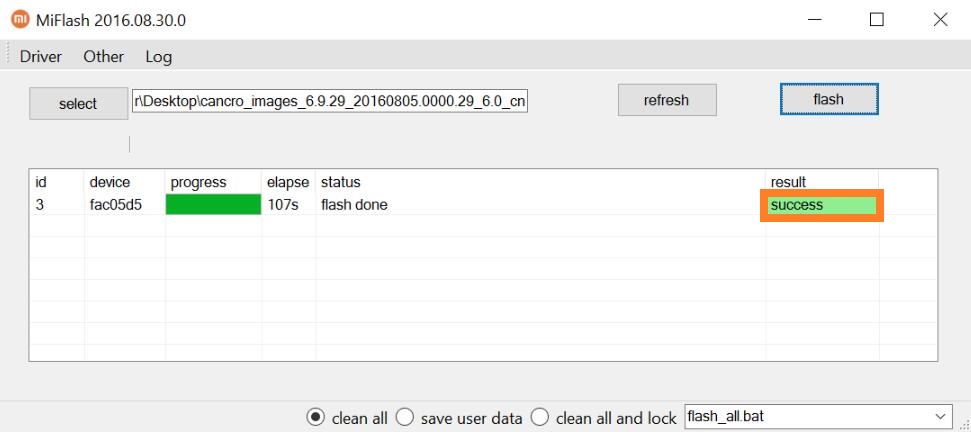
- You will see the status as “Success” after a few minutes.
MIUI 12 Global Stable vs Global Stable Beta
Xiaomi begins the roll-out process by launching a MIUI Global Stable Beta build. These are only available to Mi users who take part in the MIUI Pilot program.
MIUI Global Stable beta builds are essentially the final stable builds, however, they are first sent to beta testers to weed out any bugs or software issues. After taking feedback from beta users, Xiaomi fixes the small errors, if there are any, and rolls out the same update for all the Xiaomi users.
If you try to flash the beta build without being part of the beta program, the Xiaomi device will come with an error that the device is not authorized.
We will keep adding new MIUI 12 download links, so make sure to bookmark this article.
The post MIUI 12 Stable Update Tracker: Has Your Xiaomi Device Received An Update? appeared first on Fossbytes.
MIUI 12 Stable Update Tracker: Has Your Xiaomi Device Received An Update?
read more


No comments:
Post a Comment